# Getting Started with Lottie Animations in an Android App
*By Naail Abdul Rahman · January 16, 2026*
A step-by-step on how to get started with Lottie animations in an Android app.
---
This blog was originally published on 5 May 2020. It has since been updated as of 16 January 2026.
[Lottie](lottiefiles.com/what-is-lottie) is a lightweight animation format that makes it easy to bring rich, vector animations into your Android app with minimal setup. In this guide, you’ll learn how to add and configure Lottie animations in Android Studio.
# 1\. Choose your Lottie
Start by selecting a Lottie animation for your Android app. You can use your own animation or choose from the [thousands of free animations available on LottieFiles](https://lottiefiles.com/featured).
It’s important to test your selected animation using the [**LottieFiles app for Android**](https://lottiefiles.com/android) to ensure it renders correctly. While Lottie aims to be consistent across platforms, some animations may use features that aren’t fully supported by the Android runtime.
To preview an animation:
1. Install the LottieFiles app for Android
2. Open an animation on LottieFiles
3. Scan the QR code under the animation to preview it on your device
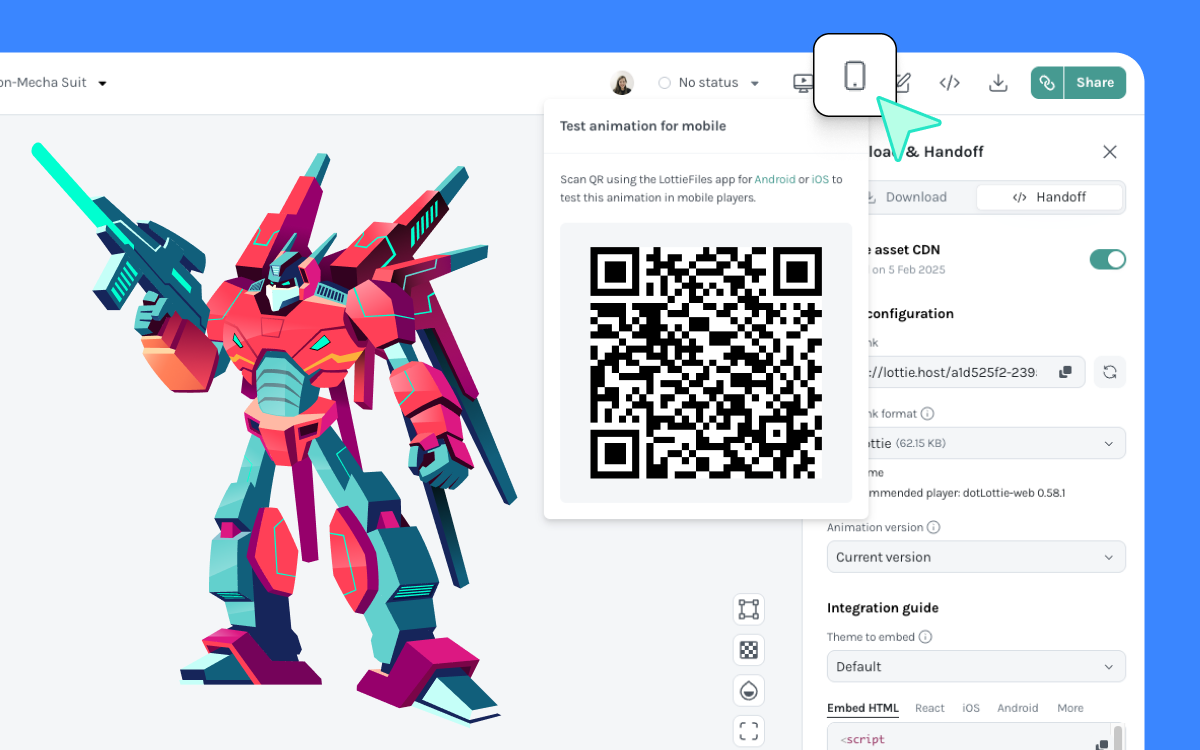
Get LottieFiles for Android
# 2\. Setup your project
This guide assumes you’re using Android Studio, but the same steps apply if you’re using another IDE.
Open your module’s build.gradle file and add the Lottie dependency:
```kotlin
def lottieVersion = "6.x.x"
implementation "com.airbnb.android:lottie:$lottieVersion"
```
Replace lottieVersion with the [latest available](https://search.maven.org/artifact/com.airbnb.android/lottie).
Note: If your project uses Jetpack Compose, Lottie provides a dedicated Compose library. See the Jetpack Compose section below.
# Add LottieAnimationView to your layout
The lottie-android library includes LottieAnimationView, which handles loading and rendering animations for you.
Add it to your layout XML where you want the animation to appear:
```xml
```
# Recommended: Bundling animations with your app
If your app needs to play animations offline, you can bundle them directly with your application.
1. Create a raw resources folder if you don’t already have one
(File > New > Android Resource Directory, then select raw)
2. Download your animation and place it in the res/raw directory
- Use a .json file for animations without external images
- Use a .zip file if the animation includes image assets
```xml
```
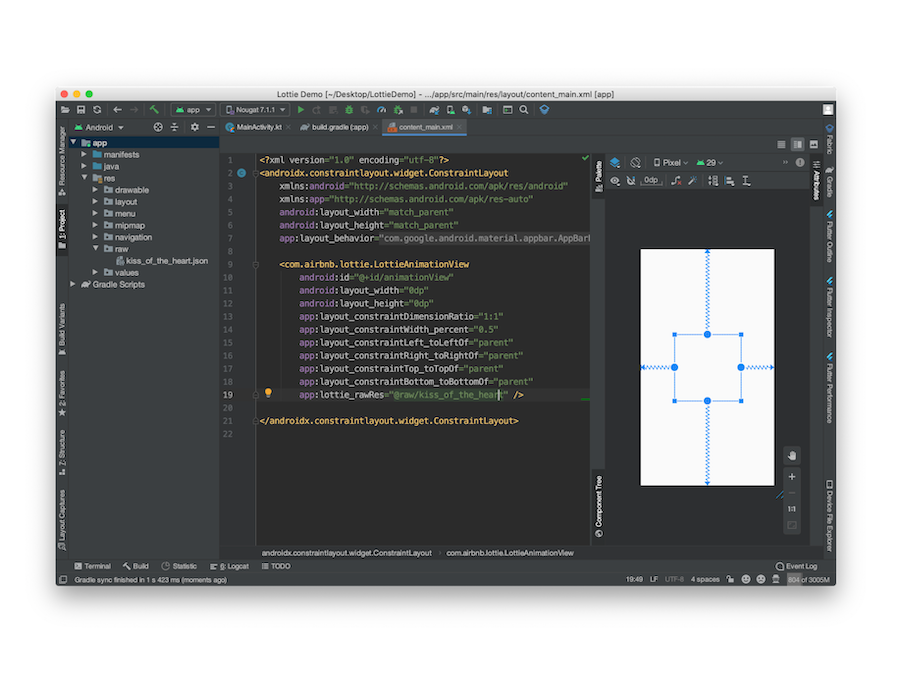
Your first Android project with Lottie animations is ready to go! All that’s left for you to do from here is to configure your project further and customize the animation behaviour.
[The official documentation for lottie-android](http://airbnb.io/lottie/#/android) provides further information on these configurations.
## **5\. (Optional) Using Lottie with Jetpack Compose**
Jetpack Compose is Android’s modern UI toolkit, and Lottie provides first-class support for Compose alongside the traditional View-based approach.
If your app is built with Compose, you can render Lottie animations directly inside composable functions.
### **5.1 Add the Compose dependency**
In your module’s build.gradle file:
```kotlin
implementation "com.airbnb.android:lottie-compose:6.x.x"
```
This is a separate artifact from the View-based lottie-android dependency. Once you’ve added the dependency, and assuming you already bundled the animation in your app as described above, you can go ahead and add the animation to your app.
### **5.2 Basic Lottie animation in Compose**
```kotlin
@Composable
fun LottieComposeAnimation() {
val composition by rememberLottieComposition(
LottieCompositionSpec.RawRes(R.raw.animation)
)
val progress by animateLottieCompositionAsState(
composition = composition,
iterations = LottieConstants.IterateForever
)
LottieAnimation(
composition = composition,
progress = { progress }
)
}
```
In Compose, animation playback is driven by state. You can easily control looping, playback, speed, or pause and resume based on user interaction.
## Get more in your Android apps with our most optimized format - dotLottie
To further optimize Android apps, consider using **dotLottie** files. dotLottie is an evolution of the Lottie format designed to reduce file sizes and simplify asset management.
dotLottie files:
- Use ZIP compression to reduce file size (often up to 80%)
- Can bundle multiple animations, images, and themes in a single file
- Support advanced features like interactive [state machines](http://lottiefiles.com/state-machines) and [theming](http://lottiefiles.com/theming)
LottieFiles provides dedicated dotLottie Android libraries and runtimes to render .lottie files efficiently on Android.
To help you get started, check out these blogs:
- [Introducing dotLottie runtimes for real-world products](https://lottiefiles.com/blog/working-with-lottie-animations/how-dotlottie-runtimes-solve-lottie)
- [Getting Started with dotLottie Player for Android](https://lottiefiles.com/blog/working-with-lottie-animations/getting-started-with-dotlottie-player-android)
- [Implement State Machines on iOS & Android Apps: A Guide](https://lottiefiles.com/blog/working-with-lottie-animations/how-to-implement-dotlottie-state-machines-on-ios-and-android-apps)
Explore free animations for your Android apps
---
## Related Articles
- [Lottie/dotLottie vs. GIF: Choosing the Right Animation for You](/blog/working-with-lottie-animations/lottie-vs-gif)
- [Introducing Motion Copilot 2.0 in Lottie Creator](/blog/working-with-lottie-animations/introducing-motion-copilot-on-lottie-creator)
- [Lottie Creator 2.0: A Powerful Web-Based Lottie Animation Tool](/blog/working-with-lottie-animations/lottie-creator-a-powerful-web-based-lottie-animation-tool)
- [Introducing Motion System: One Workflow for Animation That Actually Ships](/blog/working-with-lottie-animations/introducing-motion-system-one-workflow-for-animation-that-actually-ships)