


+

Mejora tus sitios web con animaciones Lottie altamente personalizables para aumentar la participación y conversiones.
Acceda a la biblioteca de animaciones Lottie más grande del mundo dentro de Webflow y agregue fácilmente magia de movimiento en todos sus sitios Webflow.
Más de 100,000 animaciones Lottie gratuitas, listas para usar, para que puedas empezar
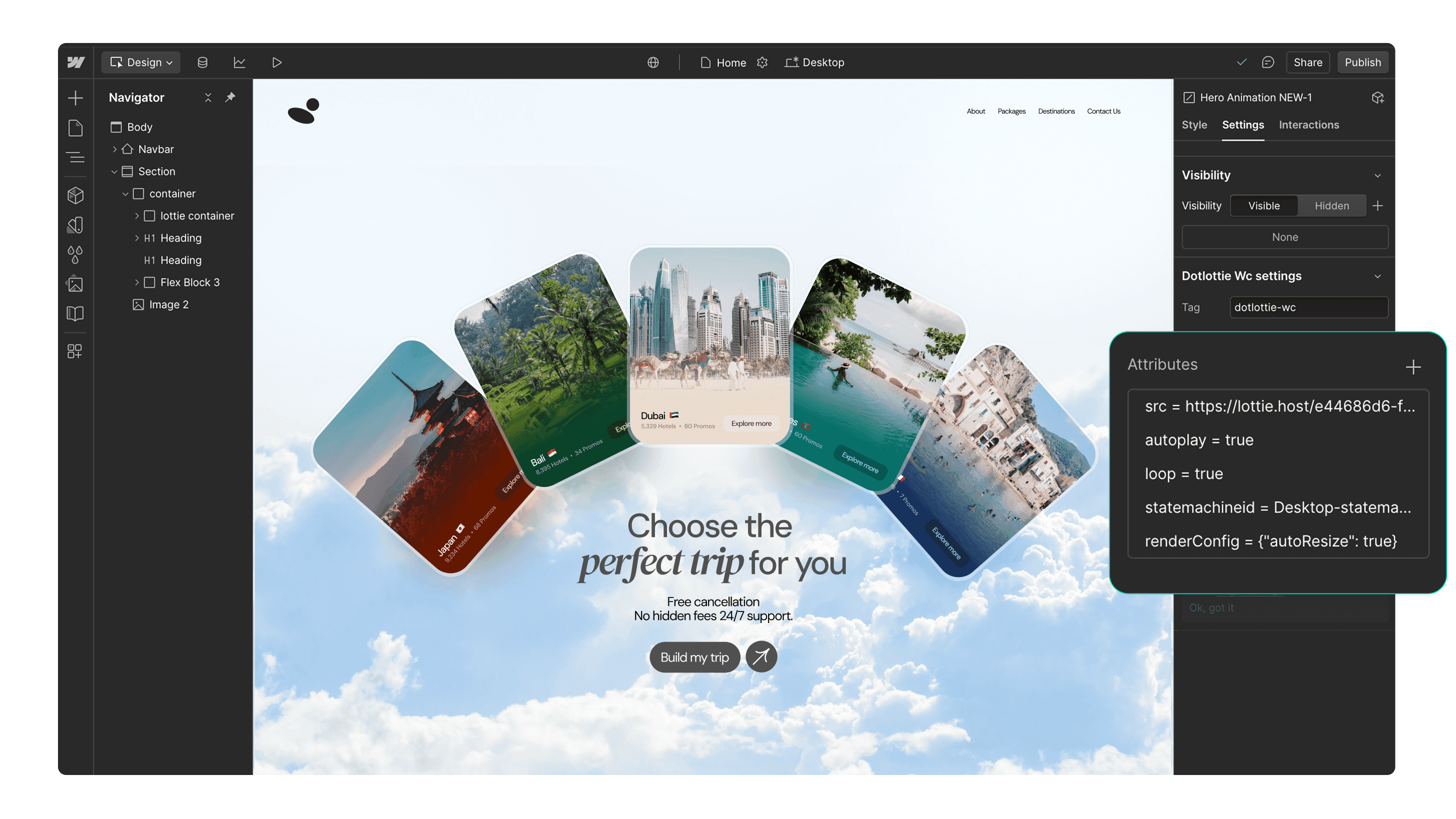
Add interactive Lottie animations with a built-in State Machines into your Webflow project
Más de 100,000 animaciones Lottie gratuitas, listas para usar, para que puedas empezar
Accede a las animaciones privadas de tu equipo e insértalas directamente en Webflow
Soporte nativo optimizado de dotLottie en Webflow para una carga más rápida de la página
Personaliza fácilmente las animaciones para que coincidan con los colores de tu marca
Funciona perfectamente con las funciones de interactividad de Webflow
Captiva a tus usuarios con animaciones basadas en desencadenadores
Page load
Parallax
Reveal
Construido con Lottie. Hecho en Webflow.
Descubre e inspírate con estos impresionantes sitios web de Webflow que fueron construidos usando animaciones Lottie.


Comience en 3 simples pasos

Instala la app
Instala la aplicación LottieFiles for Webflow y autorízala para tus proyectos.

Buscar una animación
Busca una animación de Lottie usando las pestañas 'Descubrir' o 'Espacios de trabajo'.

Inserte la animación
Inserta la animación en tus sitios de Webflow. Puedes personalizar los colores de la animación o agregar interactividad.
Recursos adicionales
Aquí tienes algo de inspiración para empezar con LottieFiles para Webflow.








FAQs
¿Qué es LottieFiles para Webflow?
LottieFiles for Webflow is an official Webflow app that lets you easily add lightweight, scalable Lottie animations to your website without writing code. It gives you access to over 100,000 free animations plus your private LottieFiles workspace, all directly inside Webflow. Perfect for creating engaging, high-performance visuals in JSON or dotLottie format.
¿Cómo instalo LottieFiles para Webflow?
To install LottieFiles for Webflow from the Webflow Marketplace:
1. Go to the LottieFiles for Webflow app’s page on the Webflow Marketplace
2. Click ‘Add to site’
3. Select the Workspaces and/or sites you want to add the app to
4. Click ‘Authorize app’
5. Click ‘Go to LottieFiles for Webflow’ on the pop-up banner
6. Follow the app’s instructions to add it to your site
¿Dónde puedo encontrar animaciones de Lottie para mis sitios de Webflow?
LottieFiles for Webflow provides access to a vast library of Lottie animations right within Webflow. You can browse through the library directly from within Webflow, search for specific animations based on keywords or categories, and choose the ones that best suit your design needs.
¿Se admiten animaciones de Lottie en Webflow?
Yes. Webflow natively supports Lottie animations in both JSON and dotLottie formats, ensuring they load quickly and maintain high visual quality. This means you can integrate interactive, scalable animations directly into your Webflow projects without additional setup.
¿Puedo personalizar las animaciones de Lottie en mis sitios de Webflow?
Yes, LottieFiles for Webflow allows you to customize the inserted animations by applying your brand colors.
¿Son gratuitas las animaciones de Lottie en LottieFiles para Webflow?
Yes. LottieFiles for Webflow includes thousands of free animations you can use in your projects. Some premium animations may also be available for purchase within the LottieFiles library.
¿Puedo usar LottieFiles para Webflow en mis proyectos comerciales?
Yes, you can use LottieFiles for Webflow in both personal and commercial projects. The app provides a versatile collection of animations that can elevate the visual appeal of your Webflow sites.
¿Se añaden nuevas animaciones regularmente a LottieFiles para Webflow?
Yes, the creators in the LottieFiles community add hundreds of new animations to the public library every day. This ensures that you always have fresh and exciting options to choose from, providing endless possibilities for your Webflow sites.
¿Hay algún límite en el número de animaciones Lottie que puedo usar con LottieFiles for Webflow?
There is no specific limit to the number of Lottie animations you can use with LottieFiles for Webflow. You can incorporate as many animations as you desire, allowing you to create truly immersive and engaging websites.
¿Puedo acceder a mis animaciones privadas a través de la aplicación LottieFiles for Webflow?
Yes, you can access and insert your private animations from your LottieFiles workspace directly into your Webflow sites.
What are trigger-based animations in LottieFiles for Webflow?
Trigger-based animations in LottieFiles for Webflow are animations that play based on specific user actions or page events, such as when a page loads, when a user scrolls (parallax), or when an element is revealed on screen. These animations help create a more interactive and engaging user experience, guiding attention and adding visual interest to your site.
Do Lottie animations affect my site speed in Webflow?
Lottie animations are lightweight and optimised for web performance. For best results, use the dotLottie format, keep animation complexity minimal, and limit the number of simultaneous animations on a page to ensure fast loading.
¿Listo para añadir movimiento a Webflow?
Con LottieFiles for Webflow, puedes agregar movimiento a tu sitio de Webflow de forma rápida y sencilla.