


Webflow内で世界最大のLottieアニメーションライブラリにアクセスし、すべてのWebflowサイトに簡単にモーションマジックを追加できます。
始めるための100,000以上の無料の使用準備ができたLottieアニメーション
Add interactive Lottie animations with a built-in State Machines into your Webflow project
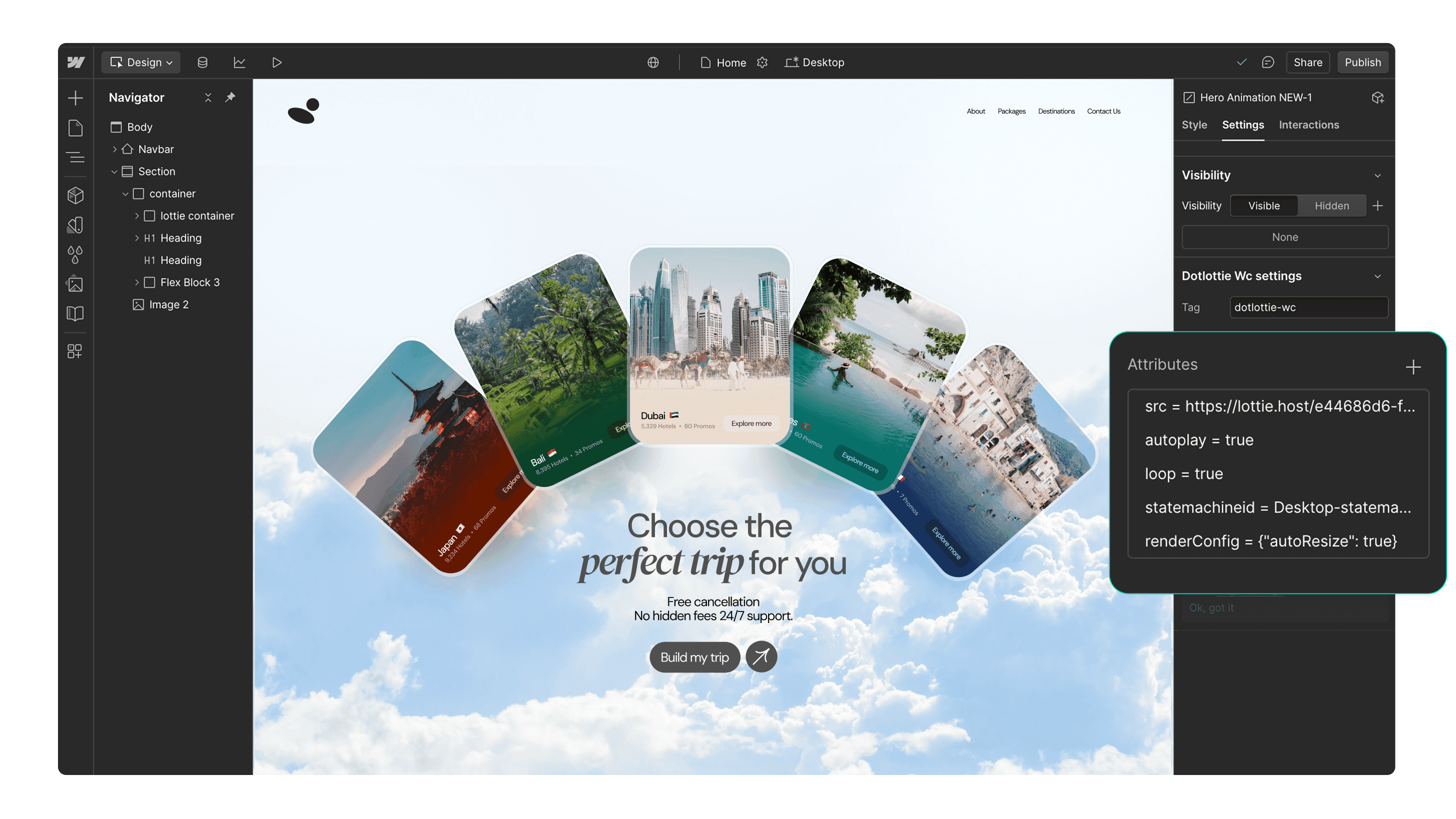
始めるための100,000以上の無料の使用準備ができたLottieアニメーション
チームのプライベートアニメーションにアクセスし、それらを直接Webflowに挿入します
ウェブフローでのネイティブ最適化されたdotLottieサポートにより、ページの読み込み速度が向上しました
ブランドカラーに合わせてアニメーションを簡単にパーソナライズ
Webflowの相互作用機能とシームレスに連携します
トリガーベースのアニメーションでユーザーを魅了します
Page load
Parallax
Reveal
Lottie で作成、Webflow で製作。
これらの見事なWebflowサイトを発見してインスピレーションを受けましょう。これらはLottieアニメーションを使用して構築されました。


3つの簡単なステップで始めましょう


アニメーションを検索
「Discover」または「Workspaces」タブを使用して、Lottieアニメーションを検索します。

アニメーションを挿入します
Webflow サイトにアニメーションを挿入します。アニメーションの色をカスタマイズしたり、相互作用を追加したりできます。
追加のリソース
LottieFiles for Webflowを始めるためのいくつかのインスピレーションを提供します。








FAQs
Webflow向けのLottieFilesとは何ですか?
LottieFiles for Webflow is an official Webflow app that lets you easily add lightweight, scalable Lottie animations to your website without writing code. It gives you access to over 100,000 free animations plus your private LottieFiles workspace, all directly inside Webflow. Perfect for creating engaging, high-performance visuals in JSON or dotLottie format.
LottieFiles for Webflowをインストールする方法は?
To install LottieFiles for Webflow from the Webflow Marketplace:
1. Go to the LottieFiles for Webflow app’s page on the Webflow Marketplace
2. Click ‘Add to site’
3. Select the Workspaces and/or sites you want to add the app to
4. Click ‘Authorize app’
5. Click ‘Go to LottieFiles for Webflow’ on the pop-up banner
6. Follow the app’s instructions to add it to your site
WebflowサイトにLottieアニメーションを見つけることができる場所はどこですか?
LottieFiles for Webflow provides access to a vast library of Lottie animations right within Webflow. You can browse through the library directly from within Webflow, search for specific animations based on keywords or categories, and choose the ones that best suit your design needs.
WebflowでLottieアニメーションがサポートされていますか?
Yes. Webflow natively supports Lottie animations in both JSON and dotLottie formats, ensuring they load quickly and maintain high visual quality. This means you can integrate interactive, scalable animations directly into your Webflow projects without additional setup.
WebflowサイトでLottieアニメーションをカスタマイズできますか?
Yes, LottieFiles for Webflow allows you to customize the inserted animations by applying your brand colors.
Webflow用のLottieFilesのLottieアニメーションは無料ですか?
Yes. LottieFiles for Webflow includes thousands of free animations you can use in your projects. Some premium animations may also be available for purchase within the LottieFiles library.
私の商用プロジェクトでWebflow用のLottieFilesを使用してもいいですか?
Yes, you can use LottieFiles for Webflow in both personal and commercial projects. The app provides a versatile collection of animations that can elevate the visual appeal of your Webflow sites.
LottieFiles for Webflowには定期的に新しいアニメーションが追加されていますか?
Yes, the creators in the LottieFiles community add hundreds of new animations to the public library every day. This ensures that you always have fresh and exciting options to choose from, providing endless possibilities for your Webflow sites.
WebflowでLottieFilesを使用する際に利用できるLottieアニメーションの数には制限がありますか?
There is no specific limit to the number of Lottie animations you can use with LottieFiles for Webflow. You can incorporate as many animations as you desire, allowing you to create truly immersive and engaging websites.
私はWebflowアプリを通じて私のプライベートアニメーションにアクセスできますか?
Yes, you can access and insert your private animations from your LottieFiles workspace directly into your Webflow sites.
What are trigger-based animations in LottieFiles for Webflow?
Trigger-based animations in LottieFiles for Webflow are animations that play based on specific user actions or page events, such as when a page loads, when a user scrolls (parallax), or when an element is revealed on screen. These animations help create a more interactive and engaging user experience, guiding attention and adding visual interest to your site.
Do Lottie animations affect my site speed in Webflow?
Lottie animations are lightweight and optimised for web performance. For best results, use the dotLottie format, keep animation complexity minimal, and limit the number of simultaneous animations on a page to ensure fast loading.
Webflow に動きを追加する準備はできていますか?
LottieFiles for Webflowを使用すると、Webflowサイトに簡単かつ迅速にモーションを追加できます。