LottieFiles

LottieFiles MCP: make motion with your AI agent

Creator MCP gives your agent a real animation engine. It builds editable scenes with layers and keyframes, then exports Lottie or video.

Connect Creator MCP

Other clients
claude mcp add --transport http --scope user creator-mcp https://creator.mcp.lottiefiles.com/mcp

Then run /mcp in Claude Code and sign in.

codex mcp add creator-mcp --url https://creator.mcp.lottiefiles.com/mcp

Then complete the sign-in prompt.

{ "mcpServers": { "creator-mcp": { "url": "https://creator.mcp.lottiefiles.com/mcp" } } }

Add to ~/.cursor/mcp.json, then sign in from MCP settings.

https://creator.mcp.lottiefiles.com/mcp

Paste it in Customize, Connectors, Add custom connector.

https://creator.mcp.lottiefiles.com/mcp

Add it as a plugin in ChatGPT. See the steps

Creator MCP: the motion engine for agents

Your agent builds a real scene with layers, keyframes and easing. You get a file you can still edit.

Make a 10 second 1920x1080 launch film from the attached files. Time it to the music.
products.svgstoryboard.mdlaunch.mp3
  • Imports your artwork
  • Builds the animated scene
  • Reviews key frames
  • dotLottie
  • Lottie JSON
  • MP4
  • WebM
  • GIF
  1. A prompt surrounded by project files

    Describe the result

    A prompt, or your own SVG, images and audio.

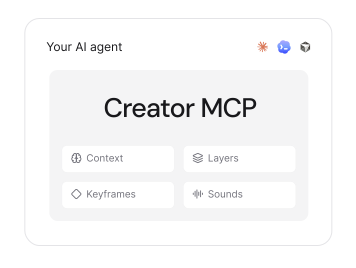
  2. Creator MCP inside your AI agent, with context, layers, keyframes and sounds

    Preview and refine

    Review frames in the chat and ask for changes.

  3. Export formats

    Export and use it

    Lottie, dotLottie, MP4, WebM or GIF. Or finish by hand in Lottie Creator.

Motion for everything you're building

  • Launch your next big thing

    Turn your UI, brand assets and audio into a product film that's ready to share.

  • Make every scroll count

    Build vertical shorts with animated type, scene changes and voiceover-led timing.

  • Give your product a little personality

    Design loading, success and interaction states as lightweight vector animations.

  • Make your brand move as one

    Give a whole family of icons and logos the same timing, style and unmistakable feel.

Let your agent set it up

Add the Creator MCP server at https://creator.mcp.lottiefiles.com/mcp and help me sign in.

See everything Creator MCP can do

LottieFiles MCP: your workspace, from the chat

Your agent can search, organize and update your projects and animations.

  • Explore your workspace

    List projects and what is in each.

  • Find and organize

    Search by name or tag and sort the results.

  • Make changes

    Rename, retag and tidy up.

  • Build against the API

    Query the full LottieFiles GraphQL schema.

To make animations, use Creator MCP.

Connect LottieFiles MCP

claude mcp add --transport http lottiefiles https://mcp.lottiefiles.com/mcp

Then run /mcp in Claude Code and sign in.

{ "mcpServers": { "lottiefiles": { "url": "https://mcp.lottiefiles.com/mcp" } } }

Add to ~/.cursor/mcp.json, then sign in when prompted.

{ "servers": { "lottiefiles": { "type": "http", "url": "https://mcp.lottiefiles.com/mcp" } } }

Add to .vscode/mcp.json, then sign in when prompted.

https://mcp.lottiefiles.com/mcp

Paste it in Settings, Connectors, Add custom connector.

https://mcp.lottiefiles.com/mcp

Add it in your client's MCP settings. Windsurf, Zed and more

Read the docs

More ways to connect

Creator WebMCP

Paste a prompt into ChatGPT desktop or your browser agent. It draws in a Lottie Creator tab.

Open LottieFiles Creator and use its site tools to create an animation of several bouncing balls, each with a different bounce height and timing

Read the WebMCP guide

Which LottieFiles MCP should I use?

JobServerRunsSign-inYou get
Make new motionCreator MCPHostedRequiredLottie, dotLottie, MP4, WebM, GIF
Manage your workspaceLottieFiles MCPHostedRequiredYour projects and animations, organized
Draw in a Creator tabCreator WebMCPBrowserRequiredEditable Lottie in Creator
Find animated iconsGenerative Icons MCPHostedNoneIcon files and code

Frequently asked questions

Go to Help & Support

Give your agent a motion engine

Add Creator MCP and ask for your first scene.

claude mcp add --transport http --scope user creator-mcp https://creator.mcp.lottiefiles.com/mcp
Get Creator MCP