


+

Melhore seus websites com animações Lottie altamente personalizáveis para aumentar o envolvimento e as conversões.
Acesse a maior biblioteca de animações Lottie do mundo dentro do Webflow e adicione facilmente movimento mágico em todos os seus sites Webflow.
Mais de 100.000 animações Lottie gratuitas e prontas para usar para começar
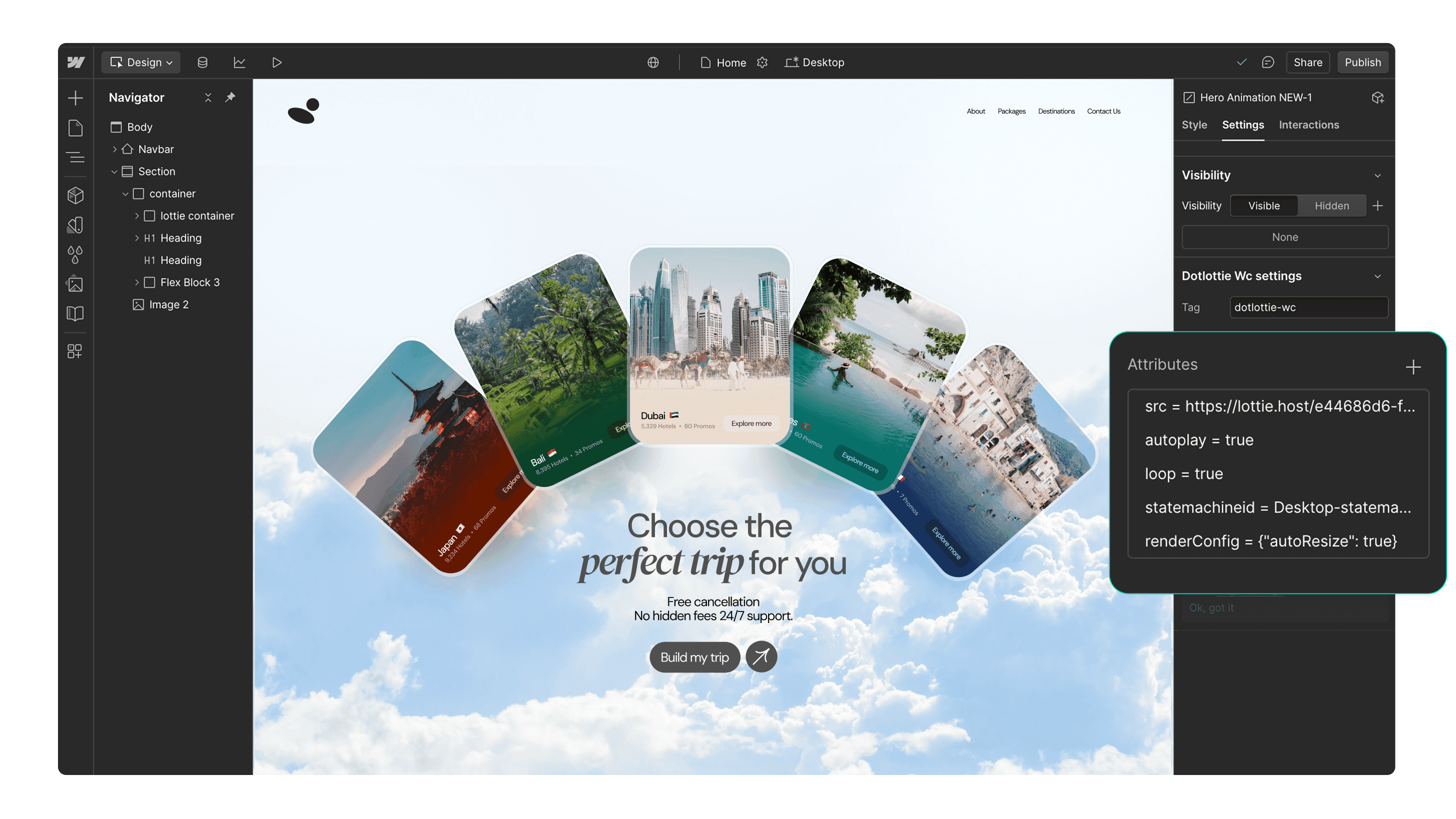
Add interactive Lottie animations with a built-in State Machines into your Webflow project
Mais de 100.000 animações Lottie gratuitas e prontas para usar para começar
Aceda às animações privadas da sua equipa e inseri-las diretamente no Webflow
Suporte nativo otimizado dotLottie no Webflow para carregamento mais rápido das páginas
Personalize animações sem esforço para combinar com as cores da sua marca
Funciona perfeitamente com os recursos de interatividade do Webflow
Cautive os seus usuários com animações baseadas em gatilhos
Page load
Parallax
Reveal
Construído com Lottie. Feito em Webflow.
Descubra e inspire-se com estes impressionantes sites Webflow que foram construídos usando animações de Lottie.


Comece em 3 passos simples

Instale a aplicação
Instale a aplicação LottieFiles for Webflow e autorize-a para os seus projetos.

Suche nach einer Animation
Procure uma animação Lottie usando as abas ‘Discover’ ou ‘Workspaces’.

Inserir a animação
Insira a animação nos seus sites Webflow. Você pode personalizar as cores da animação ou adicionar interatividade.
Recursos adicionais
Aqui está alguma inspiração para começar com LottieFiles para Webflow.








FAQs
Para que serve o LottieFiles para o Webflow?
LottieFiles for Webflow is an official Webflow app that lets you easily add lightweight, scalable Lottie animations to your website without writing code. It gives you access to over 100,000 free animations plus your private LottieFiles workspace, all directly inside Webflow. Perfect for creating engaging, high-performance visuals in JSON or dotLottie format.
Como posso instalar arquivos Lottie para o Webflow?
To install LottieFiles for Webflow from the Webflow Marketplace:
1. Go to the LottieFiles for Webflow app’s page on the Webflow Marketplace
2. Click ‘Add to site’
3. Select the Workspaces and/or sites you want to add the app to
4. Click ‘Authorize app’
5. Click ‘Go to LottieFiles for Webflow’ on the pop-up banner
6. Follow the app’s instructions to add it to your site
Onde posso encontrar animações Lottie para os meus sites Webflow?
LottieFiles for Webflow provides access to a vast library of Lottie animations right within Webflow. You can browse through the library directly from within Webflow, search for specific animations based on keywords or categories, and choose the ones that best suit your design needs.
As animações Lottie são suportadas no Webflow?
Yes. Webflow natively supports Lottie animations in both JSON and dotLottie formats, ensuring they load quickly and maintain high visual quality. This means you can integrate interactive, scalable animations directly into your Webflow projects without additional setup.
Posso personalizar as animações de Lottie nos meus sites Webflow?
Yes, LottieFiles for Webflow allows you to customize the inserted animations by applying your brand colors.
As animações do Lottie no LottieFiles para Webflow são gratuitas?
Yes. LottieFiles for Webflow includes thousands of free animations you can use in your projects. Some premium animations may also be available for purchase within the LottieFiles library.
Posso usar LottieFiles para Webflow nos meus projetos comerciais?
Yes, you can use LottieFiles for Webflow in both personal and commercial projects. The app provides a versatile collection of animations that can elevate the visual appeal of your Webflow sites.
São adicionadas regularmente novas animações ao LottieFiles para Webflow?
Yes, the creators in the LottieFiles community add hundreds of new animations to the public library every day. This ensures that you always have fresh and exciting options to choose from, providing endless possibilities for your Webflow sites.
Existe um limite para o número de animações Lottie que posso usar com o LottieFiles para o Webflow?
There is no specific limit to the number of Lottie animations you can use with LottieFiles for Webflow. You can incorporate as many animations as you desire, allowing you to create truly immersive and engaging websites.
Posso aceder às minhas animações privadas através da aplicação LottieFiles para Webflow?
Yes, you can access and insert your private animations from your LottieFiles workspace directly into your Webflow sites.
What are trigger-based animations in LottieFiles for Webflow?
Trigger-based animations in LottieFiles for Webflow are animations that play based on specific user actions or page events, such as when a page loads, when a user scrolls (parallax), or when an element is revealed on screen. These animations help create a more interactive and engaging user experience, guiding attention and adding visual interest to your site.
Do Lottie animations affect my site speed in Webflow?
Lottie animations are lightweight and optimised for web performance. For best results, use the dotLottie format, keep animation complexity minimal, and limit the number of simultaneous animations on a page to ensure fast loading.
Pronto para adicionar movimento ao Webflow?
Com o LottieFiles para Webflow, você pode adicionar movimento ao seu site Webflow de forma rápida e fácil.