
How to Document Motion in Your Design System: A Step-by-Step Guide

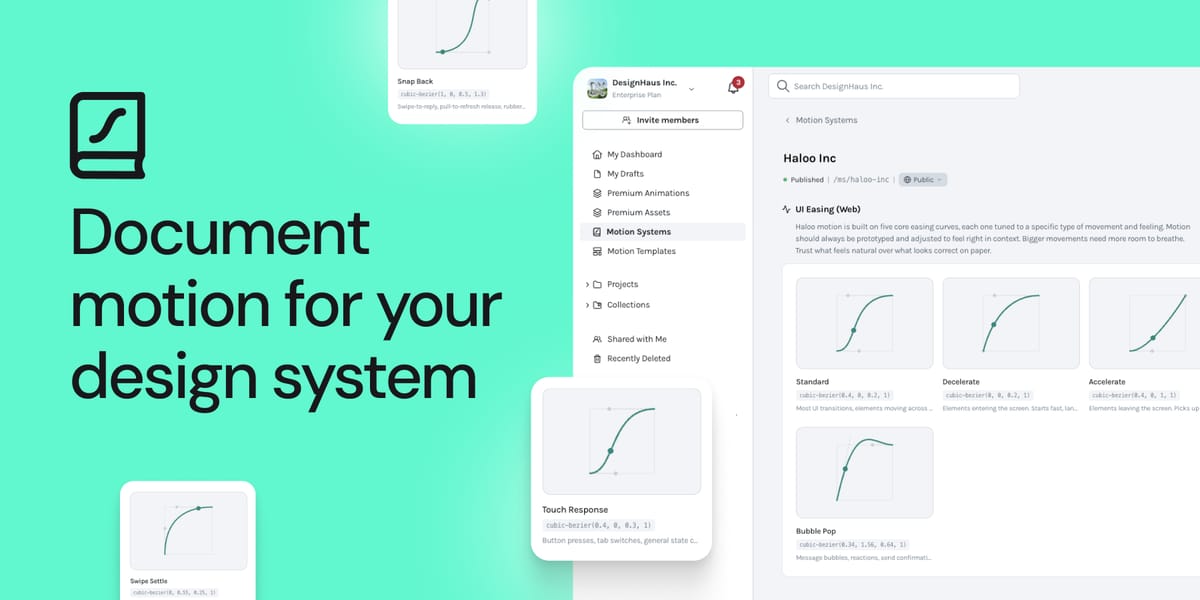
Look at your design system. Really look at it.
There are tokens for every shade in your palette. A spacing scale your team could recite from memory. Typography rules that haven't changed in two years. Component documentation with usage guidelines, do's and don'ts, accessibility notes.
Now find the motion section.
If you're like most design teams, it's either missing entirely, or it's a 47-slide presentation someone made two years ago that nobody opens anymore. Even some of the most thorough design systems in the world document motion and still struggle to govern it in practice. Because documentation without a workflow is just decoration.
This guide is for teams who want to change that, and how our newly-launched LottieFiles Motion System can make motion actually governable, not just documented.
Why motion keeps getting skipped
It's not that design teams don't value motion; most do. The problem is that motion has never had the infrastructure that other design primitives have. Colors have tokens. Typography has scales. Spacing has a grid. Motion has a senior designer's brain and a vague consensus about what "feels right."
When there are no approved defaults, every team animates differently. The same interaction gets rebuilt across squads with slightly different curves and choreography. Six months in, nobody knows what's approved.
The good news: documenting motion isn't as complicated as it sounds. You just need to do it in the right order and here's how to do just that.
Step 1: Audit what you actually have
Before you write a single principle or define a single token, take stock. Open your product and count the animations. Loading states, transitions, micro-interactions, empty states, onboarding flows, all of it.
A real audit usually surfaces something uncomfortable: the same interaction rebuilt multiple ways by different people. Different easing curves. Different choreography. Not because anyone was careless, but because there was no approved default to pull from.
Your audit should answer:
- How many unique animations does our product currently have?
- Where do the source files live? (If the answer is "in someone's personal account," that's the problem.)
- Are we consistent across platforms: web, iOS, Android?
- Do we respect reduced motion preferences?
Step 2: Define your motion principles
Principles come before tokens. They're the "why" behind every motion decision, and they prevent debates later.
Good motion principles are short and opinionated. A few that hold up across most design systems:
- Purposeful: Every animation communicates something. If it doesn't, it shouldn't exist.
- Consistent: Presets and easing come from defined values, not from muscle memory.
- Performant: Motion never slows the experience down.
- Accessible: Reduced motion preferences are always respected.
These go in your design system alongside your color principles and typography rationale. They give your team a shared reference point, and they give reviewers a way to push back on animations that don't belong.
Step 3: Create motion tokens
This is where governance becomes real. Motion tokens are named values for animation properties, the same concept as a color token or spacing token, applied to time and easing instead of pixels and hex codes.
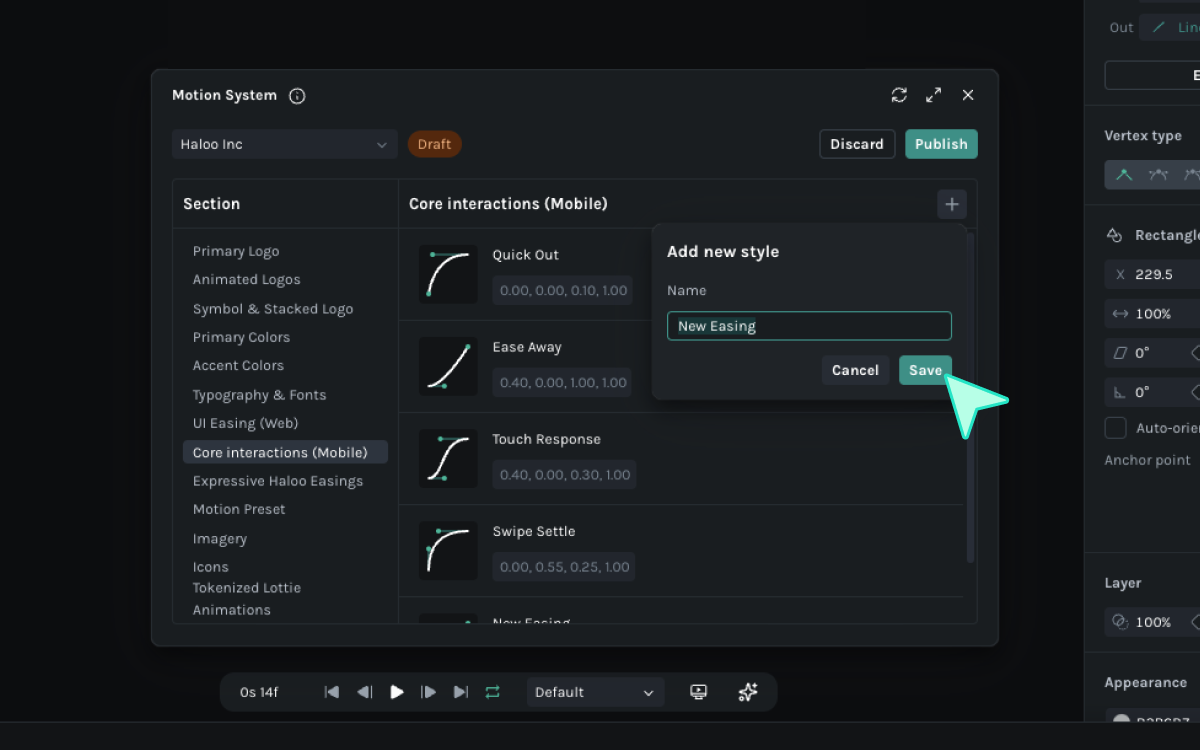
Start with these categories:
- Easing tokens: e.g.,
ease-enter,ease-exit,ease-standard, each with an exact cubic-bezier value - Delay tokens: for staggered animations
- Scale tokens: for entrance/exit transforms
Choosing a few values is just good enough to start. The goal isn't to document every possible motion scenario, it's to give your team approved defaults that they'll actually use.
Step 4: Build a shared animation library
Once your tokens exist, the next step is a library of reusable, versioned animations accessible to every team. This is exactly what LottieFiles Motion System was built for.
It's a workspace-level entity where your team's motion tokens, easing curves, approved animation presets, fonts, and assets all live together, with documentation embedded alongside each one. The system surfaces directly in Lottie Creator, After Effects, and Figma so your team is always pulling from the approved source, not starting from scratch.
You can learn more about LottieFiles Motion System here: Introducing Motion System: One Workflow for Animation That Actually Ships
Step 5: Establish governance
Documentation without governance is aspiration, not a system. You need:
- An owner: who approves new animations before they ship?
- A workflow: who creates, who reviews, who hands off to engineering?
- A single source of truth: one library, not twelve personal accounts
- Versioning: so you can always find the approved file, not the deprecated one
The Tazapay team saved 96 hours per team per quarter after centralizing their motion workflow. That's not a marginal gain; that's what happens when governance replaces guesswork.
Get started on your motion system
The design systems getting ahead of this aren't doing anything exotic. They're applying the same rigor to motion that they've always applied to color and type.
Color has an owner. Typography has an owner. Motion has a Slack channel and everyone's winging it.
That's the gap this guide closes. Own it the same way you own everything else.
You may also like

Making the Business Case for Motion: What the Numbers Actually Mean
There's a version of this conversation that starts with convincing you motion is important. This isn't that conversation.

Motion Tokens: The One Thing Missing from Your Design System
With motion tokens, it’s one master file.
Create with Motion: The Complete Guide to Shipping Motion That Actually Scales
Every other layer of your product stack has been standardized. Color, typography, spacing, components. Motion hasn't. Here's how to fix that.
The Evolution of Lottie: Why dotLottie Is the New Baseline
dotLottie is the new default for how we build, ship, and manage motion.