
Hardware-Accelerated Lottie on the Web: dotlottie-web Now Ships WebGL & WebGPU

For years, Lottie on the web has been a CPU story. Every frame every path, every matte, every gradient gets rasterized on the main thread (or a worker, if you're lucky). That works fine for a hero animation or two. It falls over the moment you have a list view full of animations, a composition with matte layers, or a UI that's already fighting for frame budget.
That story changes now.
@lottiefiles/dotlottie-web ships first class WebGL and WebGPU renderer backends, both powered by ThorVG. To our knowledge, this makes dotlottie-web the first production grade, hardware-accelerated Lottie / dotLottie player on the web.
TL;DR
npm install @lottiefiles/dotlottie-web
// Software (default, CPU)
import { DotLottie } from '@lottiefiles/dotlottie-web';

// WebGL2 (hardware accelerated)
import { DotLottie } from '@lottiefiles/dotlottie-web/webgl';

// WebGPU (next-gen hardware accelerated)
import { DotLottie } from '@lottiefiles/dotlottie-web/webgpu';
Same DotLottie API. Same .lottie files. The only thing that changes is the import path — and how much CPU you reclaim.
The performance problem nobody fixes by writing more JS
The usual advice when a Lottie animation tanks performance is "simplify the animation." Drop the matte layers. Flatten the masks. Reduce the path count. Export it to a WebM as a last resort.
That's a workaround, not a solution. The real bottleneck is rasterization: turning vectors into pixels is one of the things GPUs were literally designed to do, and a Lottie player built on a 2D canvas software rasterizer leaves that hardware idle.
Matte layers are the canonical example. A single matte with a couple of effects can spike a core to 100% on a mid range CPU. Stack a few of those on a page and your app's input latency starts to suffer before you've shipped any actual product code.
GPU rendering doesn't just go faster. It moves the work off the main thread entirely.
How it works
The full pipeline:
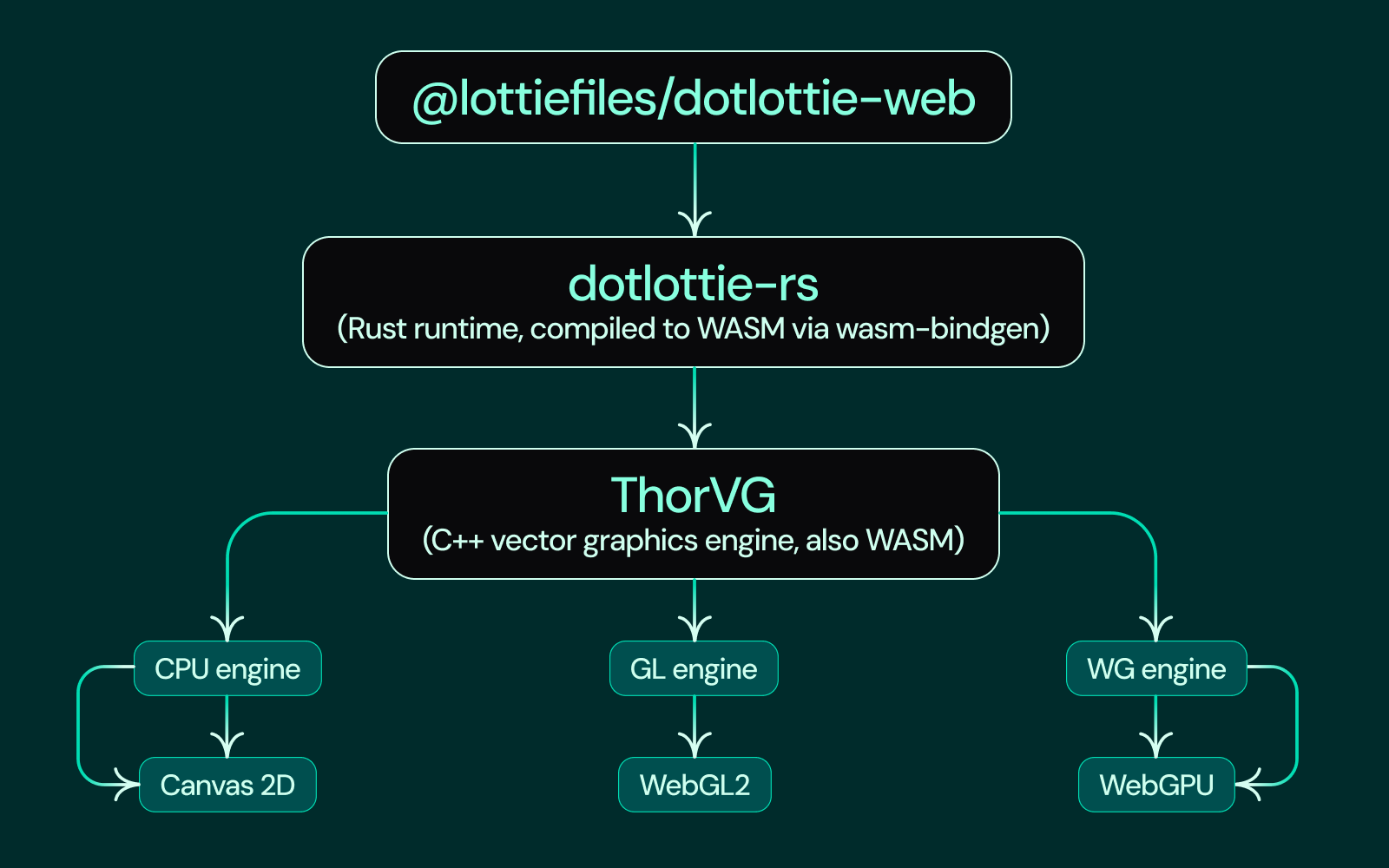
dotlottie-rs is the Rust runtime behind every official dotLottie player web, iOS, Android, Flutter, React Native. It owns parsing, the state machine engine, theming, slots, and multi-animation playback. Rendering itself is delegated to ThorVG.
ThorVG is the production C++ vector graphics engine that powers LottieFiles' renderer across every platform. Its 1.0 release promoted both the WebGL and WebGPU backends to production ready, with the GPU paths at full feature parity with the CPU path. ThorVG reports a 150%+ GPU rendering performance gain over its previous baseline.
The web build is tight too: the WASM bundles use wasm-bindgen directly. You get the binary, a small glue file, and that's it.
Quick start: vanilla JS
Pick the renderer and instantiate as usual:
import { DotLottie } from '@lottiefiles/dotlottie-web/webgpu';

const dotLottie = new DotLottie({
  canvas: document.querySelector('#my-canvas'),
  src: '<https://lottie.host/your-animation.lottie>',
  autoplay: true,
  loop: true,
});
WebGL is identical, just swap the import:
import { DotLottie } from '@lottiefiles/dotlottie-web/webgl';
Which renderer should I ship?
- Software (default). Universal compatibility, no GPU context needed. Fine for a hero animation or a simple composition.
- WebGL. Works essentially everywhere modern users actually browse from. The right default for animation heavy UIs that need broad device support today.
- WebGPU (Experimental). Faster, more headroom, access to compute shaders inside ThorVG, and a clear path forward as the API matures. Browser support is good and growing.
A reasonable production strategy: feature-detect WebGPU, fall back to WebGL, keep the software build as the last resort. Dynamic imports keep the WASM blobs out of your main chunk.
async function loadDotLottie() {
  if ('gpu' in navigator) {
    return (await import('@lottiefiles/dotlottie-web/webgpu')).DotLottie;
  }
  const canvas = document.createElement('canvas');
  if (canvas.getContext('webgl2')) {
    return (await import('@lottiefiles/dotlottie-web/webgl')).DotLottie;
  }
  return (await import('@lottiefiles/dotlottie-web')).DotLottie;
}
What you get back
The wins compound on real workloads:
- CPU freed up for your app. Matte-heavy animations that pegged a core on the software renderer now run with most of the work on the GPU.
- Higher and more stable frame rates on complex compositions, the kind that previously needed to be redesigned to ship at all.
- Visual parity. Same ThorVG core means GPU output matches CPU output, pixel for pixel. No "looks fine in dev, broken in production" surprises.
- Multiple animations on a page stop being a frame budget conversation.
Caveats worth knowing
- WebGPU isn't available on every browser yet. Treat it as progressive enhancement, not a baseline. https://caniuse.com/webgpu
- Each renderer ships its own WASM blob; pick one, or use the dynamic-import pattern above. Don't import all three "just in case."
- Renderers are per canvas. If you're rendering many small animations and care about overhead, share a single
GPUDeviceacross them
Try it
Install, swap the import, profile.
npm install @lottiefiles/dotlottie-web
The performance ceiling for Lottie on the web has moved. Time to ship the animations you've been holding back.
You may also like

How to Create Animations with AI Using Lottie Creator WebMCP
Guide to creating and refining animations with AI using Lottie Creator WebMCP.
How to Build Your First Lottie Creator Plugin: Create and Animate a Rectangle
Creating a beginner-friendly Lottie Creator plugin using the Creator plugin API.
How to Develop and Publish a Plugin for Lottie Creator
Learn how to create, test and publish a plugin to LottieFiles Extensions.
How to Publish a Lottie Creator Plugin to Extensions
Learn how to prepare, package and publish your Lottie Creator plugin to LottieFiles Extensions.