


웹플로우에서 세계 최대의 Lottie 애니메이션 라이브러리에 접근하고, 모든 웹플로우 사이트에 손쉽게 모션 애니메이션을 추가해보세요.
100,000개 이상의 무료로 사용 가능한 Lottie 애니메이션
Add interactive Lottie animations with a built-in State Machines into your Webflow project
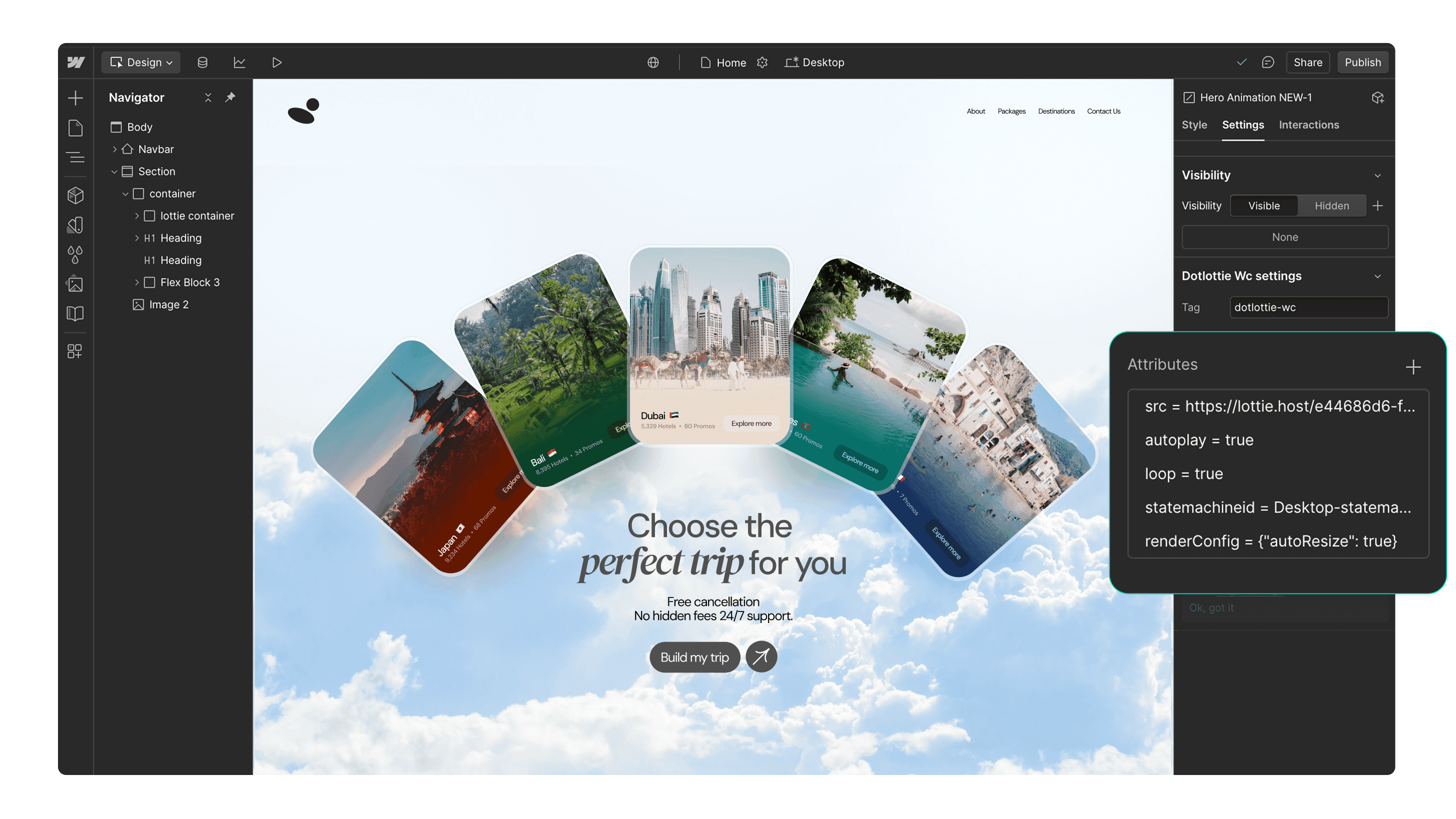
100,000개 이상의 무료로 사용 가능한 Lottie 애니메이션
팀 애니메이션에 폴더에 접속하여 웹플로우에 바로 삽입할 수 있습니다.
Optimized dotLottie를 지원하여웹플로우에서 페이지 로딩속도를 향상 시켜 줍니다.
애니메이션에 브랜드 색상을 쉽게 수정할 수 있습니다.
웹플로우 인터랙티비티 기능과 완벽하게 호환됩니다.
손끝에서 펼쳐지는 반응형 애니메이션으로 사용자의 시선을 사로잡아 보세요.
Page load
Parallax
Reveal
Lottie로 만들어진 웹플로우 웹사이트
Lottie 애니메이션을 사용하여 제작된 다양한 웹플로우 사이트들을 확인해보세요.


3가지 간단한 단계로 시작하세요


애니메이션 검색
‘Discover’ 또는 ‘Workspaces’ 탭을 사용하여 Lottie 애니메이션을 검색하세요.

애니메이션을 삽입
웹플로우 사이트에 애니메이션을 삽입하세요. 애니메이션의 색상을 수정하거나 인터랙션을 추가할 수 있습니다.
추가 자료
더 다양한 웹플로우 및 디자인 관련정보를 확인해 보세요.







FAQs
LottieFiles for Webflow 가 모에요?
LottieFiles for Webflow is an official Webflow app that lets you easily add lightweight, scalable Lottie animations to your website without writing code. It gives you access to over 100,000 free animations plus your private LottieFiles workspace, all directly inside Webflow. Perfect for creating engaging, high-performance visuals in JSON or dotLottie format.
LottieFiles 플러그인을 어떻게 설치하나요?
To install LottieFiles for Webflow from the Webflow Marketplace:
1. Go to the LottieFiles for Webflow app’s page on the Webflow Marketplace
2. Click ‘Add to site’
3. Select the Workspaces and/or sites you want to add the app to
4. Click ‘Authorize app’
5. Click ‘Go to LottieFiles for Webflow’ on the pop-up banner
6. Follow the app’s instructions to add it to your site
웹플로우 사이트에 사용할 Lottie 애니메이션은 어디에서 찾을 수 있나요?
LottieFiles for Webflow provides access to a vast library of Lottie animations right within Webflow. You can browse through the library directly from within Webflow, search for specific animations based on keywords or categories, and choose the ones that best suit your design needs.
웹플로우에서 Lottie 애니메이션이 지원되나요?
Yes. Webflow natively supports Lottie animations in both JSON and dotLottie formats, ensuring they load quickly and maintain high visual quality. This means you can integrate interactive, scalable animations directly into your Webflow projects without additional setup.
웹플로우 사이트에서 Lottie 애니메이션을 커스터마이징할 수 있나요?
Yes, LottieFiles for Webflow allows you to customize the inserted animations by applying your brand colors.
LottieFiles for Webflow의 Lottie 애니메이션은 무료인가요?
Yes. LottieFiles for Webflow includes thousands of free animations you can use in your projects. Some premium animations may also be available for purchase within the LottieFiles library.
LottieFiles for Webflow를 상업적 프로젝트에 사용할 수 있나요?
Yes, you can use LottieFiles for Webflow in both personal and commercial projects. The app provides a versatile collection of animations that can elevate the visual appeal of your Webflow sites.
LottieFiles for Webflow에 새로운 애니메이션이 정기적으로 추가되나요?
Yes, the creators in the LottieFiles community add hundreds of new animations to the public library every day. This ensures that you always have fresh and exciting options to choose from, providing endless possibilities for your Webflow sites.
LottieFiles for Webflow에서 사용할 수 있는 Lottie 애니메이션의 개수에 제한이 있나요?
There is no specific limit to the number of Lottie animations you can use with LottieFiles for Webflow. You can incorporate as many animations as you desire, allowing you to create truly immersive and engaging websites.
LottieFiles for Webflow 앱을 통해 내 개인 애니메이션에 접근할 수 있나요?
Yes, you can access and insert your private animations from your LottieFiles workspace directly into your Webflow sites.
What are trigger-based animations in LottieFiles for Webflow?
Trigger-based animations in LottieFiles for Webflow are animations that play based on specific user actions or page events, such as when a page loads, when a user scrolls (parallax), or when an element is revealed on screen. These animations help create a more interactive and engaging user experience, guiding attention and adding visual interest to your site.
Do Lottie animations affect my site speed in Webflow?
Lottie animations are lightweight and optimised for web performance. For best results, use the dotLottie format, keep animation complexity minimal, and limit the number of simultaneous animations on a page to ensure fast loading.