
14 Creative Examples of Animated 404 Pages


This blog was originally published on 5 August 2022, and has been updated on 3 September 2026.
What is a 404 page?
An animated 404 page turns a dead end into a branded moment that keeps visitors on your site instead of bouncing. The best ones pair a lightweight animation with a clear message and a way back (search, home link, or popular pages). You can build one without a motion designer: pick a ready-made 404 animation, drop in a lightweight Lottie or dotLottie file, and add a link home. This guide shows 12 real examples, then walks through building your own.
You would have likely stumbled upon a 404 page at least once (or a hundred times) when browsing through the world wide web. These pages are marked as errors or “404 not found”, signaling that a page on a website no longer exists on their server.
However, there are other reasons a 404 error page may pop up - it can be because the content was deleted off the page, the URL was incorrect, the server connection encountered an issue, or that the domain does not exist anymore.
404 error pages were often overlooked but nowadays, these landing pages have evolved with design. Without design, it would simply be a blank page with a generic 404 error message that can come off as boring or frustrating for the user, causing them to bounce out.
This is why more brands are putting thought into the way their 404 error pages are designed. These days, 404 pages are reimagined with elements such as animation and quirky copies that allow users to engage with the brand better, or simply be entertained. In recent years, web design animations have emerged as a trend, enhancing user engagement and experience across various site elements.
Why animate a 404 page?
An animated 404 earns its place for three practical reasons:
- It reduces exits. A moment of delight plus a clear path back keeps a lost visitor moving through your site instead of closing the tab.
- It reinforces your brand. A 404 is an unexpected touchpoint. Handling it with care signals attention to detail.
- It stays fast — if you use the right format. A heavy GIF or video 404 defeats the purpose. A Lottie or dotLottie animation is typically kilobytes, not megabytes, so the page still loads instantly.
A quick caution so this advice ages well: keep the animation lightweight and non-blocking, and always include real navigation (a search box or links home). Animation is the hook; the way back is the job.
Make 404 pages fun and engaging with animation
Great design has been a common theme when it comes to 404 pages, but many brands are taking it up a notch with animation. The smart use of 404 animations turns a dull error page into a brand piece to engage the user, or drive them to other web pages.
You can also add additional tools such as a search bar, page links, or a call-to-action to lead them around the site, rather than out of it.
So, here are 12 examples of 404 error landing page designs that are anything but boring.
1. Using humor in relation to the error narrative

Humor has always been a great tool for brands when used correctly. In this example, the copy itself pokes fun at the error with a headline and narrative that playfully states that the user has stumbled upon “the edge of the universe”. This copy is accompanied with animation of an astronaut floating in space holding a mobile phone, indicating that the page is unreachable.
2. Airbnb stays cute with simple animation

Airbnb's 404 landing page uses simple animation here, where the girl’s ice cream falls off the cone and her facial expression changes from happy to shocked. The page also links to other pages on the website to help navigate the user around.
3. Smart 3D animation to drive interest

This 404 animation is made with 3D elements that turn the numbers into something resembling a satellite station. This 404 animation uses elements of transportation and white domes that look like satellite dishes - this could be interpreted as data being moved around in line with the error page.
4. Mailchimp is embarrassed

Isn’t this adorable? Mailchimp places their copy front and center to admit that they lost a page, followed by an animation of a horse (or a donkey?) sticking its head underground from embarrassment.
5. Turning 404 into characters

This would work well with travel websites. The animation aptly starts with a search bar showing a travel inquiry. Before it can finish typing, it transitions to the 404 scene where the zero is a sunset and a number four chases after the other. This is as though they are on a tropical getaway - a well-played move on the travel element.
6. A storybook you can poke
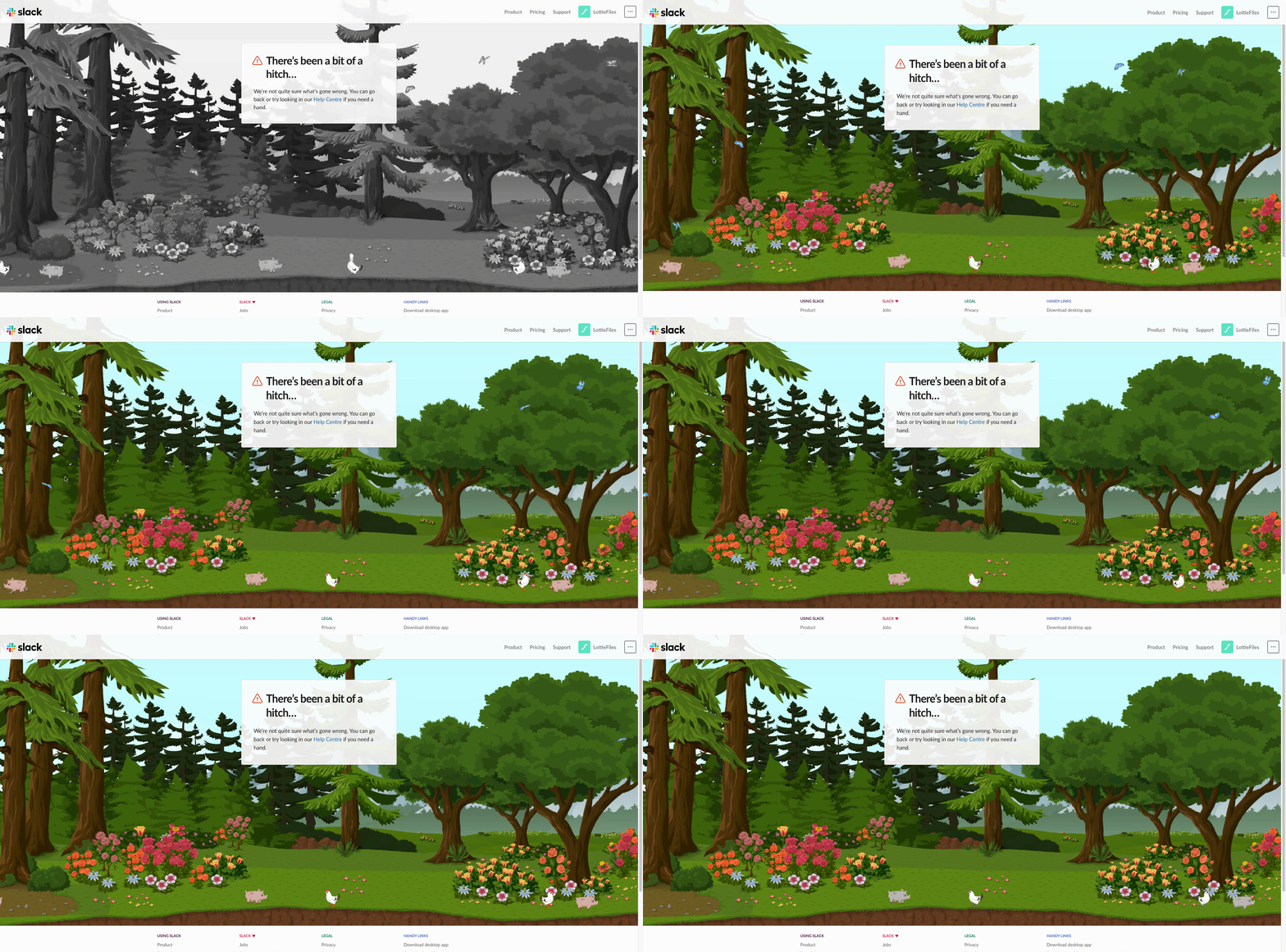
Slack's 404 leans into warmth and play: a gentle, illustrated scene with tiny interactive elements you can nudge and animate. It rewards curiosity and the visitor stays a beat longer because the page invites a small interaction rather than just apologizing. The lesson: interactivity, used lightly, buys you attention without a heavy build.
6. Keeping it simple but interactive
This is a pretty simple but engaging one - the cylindrical blobs behind the numbers are animated to move left and right. As you move the cursor over the 404, the elements move about - it almost looks like a petri dish of creatures trying to configure their way through.
7. Keeping it fun with a caveman
This shows a caveman biting a cable that indicates he is the reason why the page cannot be found. The use of a caveman is apt as his curiosity probably led him to break the cable because they did not exist in his time. Fun animation like this always entertains.
8. The 404 is lost in the dark
We know without light, a ton of things are bound to be lost. This uses that to its advantage as the page cannot be found. The light is animated to swing back and forth to shine light on the almost hidden 404 message.
9. Making 404 into an unknown galaxy
This is a minimalist, yet eye-catching 404 page. The use of animation with the number four and zero floating in zero gravity imitates an unknown galaxy - a galaxy which you are bound to be lost in if explored. The copy is also in line with this as the call-to-action asks the user to “go back to earth”.
10. Sketch’s 404 abduction

What is web browsing without our cursors? Nothing, and this plays on that. Sketch’s 404 page playfully implies that because the cursor is gone, the page cannot exist to be browsed. It follows with two call-to-actions where one is to a support section, and another to the homepage.
11. Spotify stays on-brand

Music is a way to experience emotions and here, it plays on that narrative. The copy “404 and heartbreaks” next to an animated spinning record showcases what music means to most people. Simple, but definitely on-brand for Spotify.
12. Blizzard Entertainment entertains with a murloc lost in a blizzard

Blizzard Entertainment’s 404 page is clever. Being a gaming company, it uses an animated murloc (a character in World of Warcraft) lost in an actual blizzard as a play on its brand name. It also lines up with the “page not found” messaging. The call-to-action itself uses another in-game reference – a murloc is also known as a gmmmlmrmrgmg.
13. An error that fits the brand
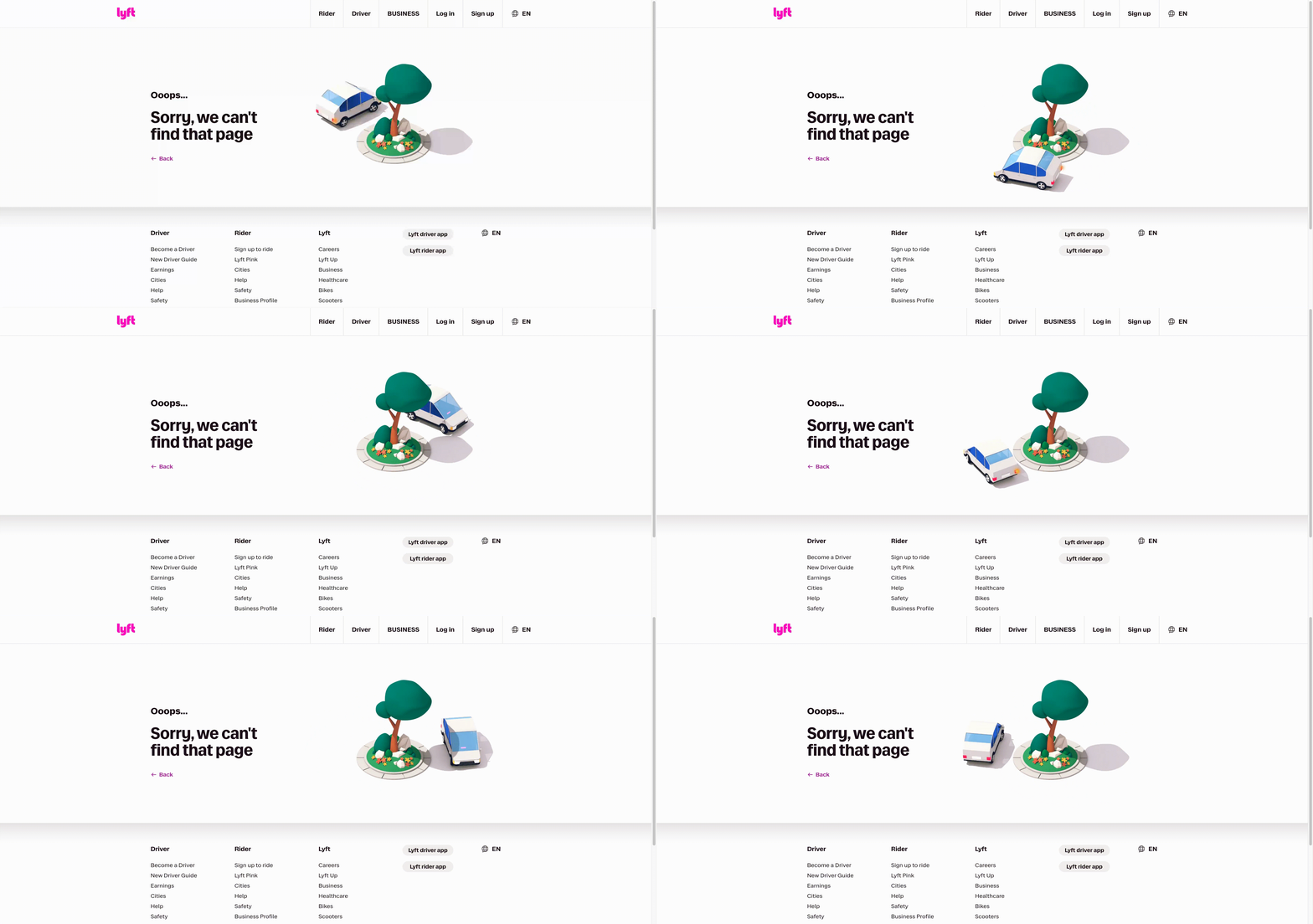
Lyft's 404 animation plays on the idea of "driving in circles" — which is the exact opposite of what you want from a ride service, and that's the joke. The error becomes an on-brand wink: the situation itself is turned into brand voice. A neat example of matching the concept of the animation to what the company actually does, rather than bolting on generic motion.
14. A 404 as a brand touchpoint
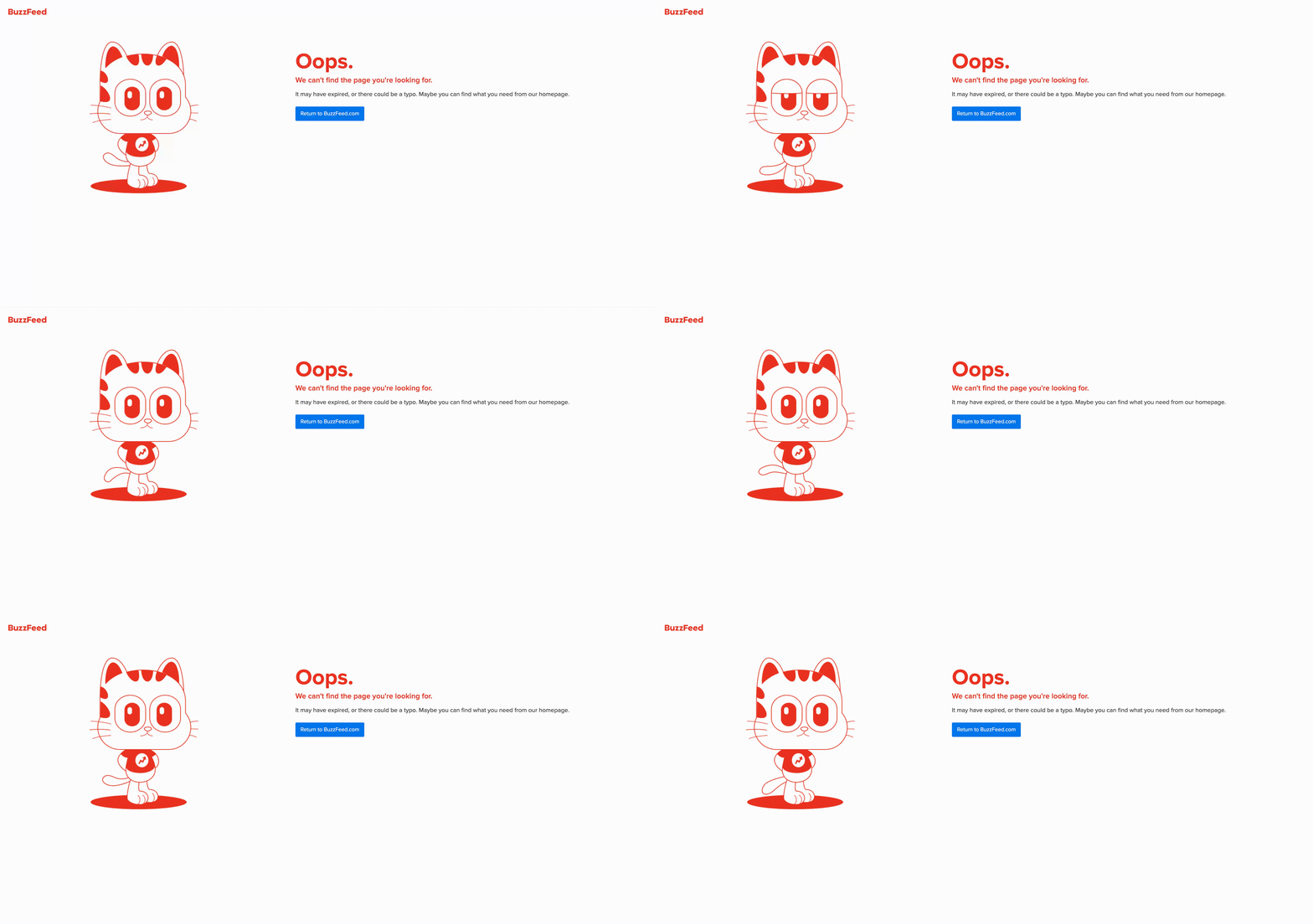
BuzzFeed treats the not-found page as free brand-awareness real estate: a blinking animated cat wearing a BuzzFeed-logo t-shirt, with a clear call to action back to the homepage. It's playful, unmistakably on-brand, and still does the one job that matters, pointing the way back.
Create 404 pages easily with Lottie animations
Creating animated 404 pages is hard – if you are creating animations from scratch, that is. But you can make an animated 404 page even if you have no knowledge of motion design.
LottieFiles offers free customizable 404 animations that you can use for your page. These Lottie animations work on both web and mobile platforms to make it easier for you to integrate your 404 pages seamlessly for iOS, Android and the web.
You can also customize the animation according to your brand or the desired visual aesthetics. Once you land on a Lottie animation you want, you can toggle the animation speed, background color, color palettes and more.
Want a 404 that's truly your own? Make the animation yourself
Picking a ready-made animation is the fast path. But if you want a 404 that's unmistakably yours with your mascot, your colors, and your joke, you can make the animation from scratch without hiring a motion designer or learning After Effects.
Lottie Creator is a free, web-based tool for creating production-ready Lottie animations. You design and animate right in the browser, and if you're not sure where to start, Motion Copilot can help block out the movement for you. Just describe what you want and it drafts the animation, which you then refine. When it's ready, export a lightweight .lottie file and drop it onto your 404 route using the steps above.
That makes Lottie Creator a genuine alternative to the traditional way of producing a Lottie. After Effects is still excellent for complex, timeline-heavy motion, but for a 404 — a character, a looping gag, a bit of brand personality — Lottie Creator gets you from idea to a production-ready animation entirely in the browser, with no desktop software and no license. And because everything you export is already a lightweight Lottie or dotLottie, your custom 404 stays fast, which is the whole point.
Create your own 404 in Lottie Creator or browse the free 404 collection to start from a template.
FAQ
What is a 404 page?
It's the page a site serves when a URL doesn't exist because the content was removed, the link was mistyped, or the address changed. The server returns an HTTP 404 "Not Found" status.
Do animated 404 pages hurt site speed?
Only if the animation is heavy. A Lottie or dotLottie 404 is typically kilobytes, so it won't slow the page — unlike a large GIF or video.
How do I add a Lottie animation to my 404 page?
Pick a 404 animation, export it as a dotLottie file, add the dotLottie web component to your page's head, and place the <dotlottie-wc> element on your 404 route with a link home.
Can I make a 404 animation without After Effects?
Yes. Lottie Creator is a free, web-based tool for creating production-ready Lottie animations; no After Effects needed.
What should every 404 page include?
A clear "page not found" message, a lightweight animation or visual, and a way back, such as a home link, a search box, and links to popular pages.
You may also like

How Do Lottie Animations Help with SEO?
Staying ahead of the competition means constant optimization.
Animated Avatars with Lottie: Building Personalized, Interactive Personas
Lottie turns animated avatars into powerful UX building blocks.
Lottie Character Animation: Bring Your Brand Mascot to Life
Lottie’s unique qualities are ideal for personality-driven motion.
Lottie for Automotive Dashboards & Navigation UI
Here's how designers and brands are prototyping next-gen HMIs & navigation apps.