


+

Améliorez vos sites web avec des animations Lottie hautement personnalisables pour augmenter l'engagement et les conversions.
Accédez à la plus grande bibliothèque d'animations Lottie au monde dans Webflow, et ajoutez facilement de la magie de mouvement sur tous vos sites Webflow.
Plus de 100 000 animations Lottie gratuites et prêtes à l'emploi pour vous lancer
Add interactive Lottie animations with a built-in State Machines into your Webflow project
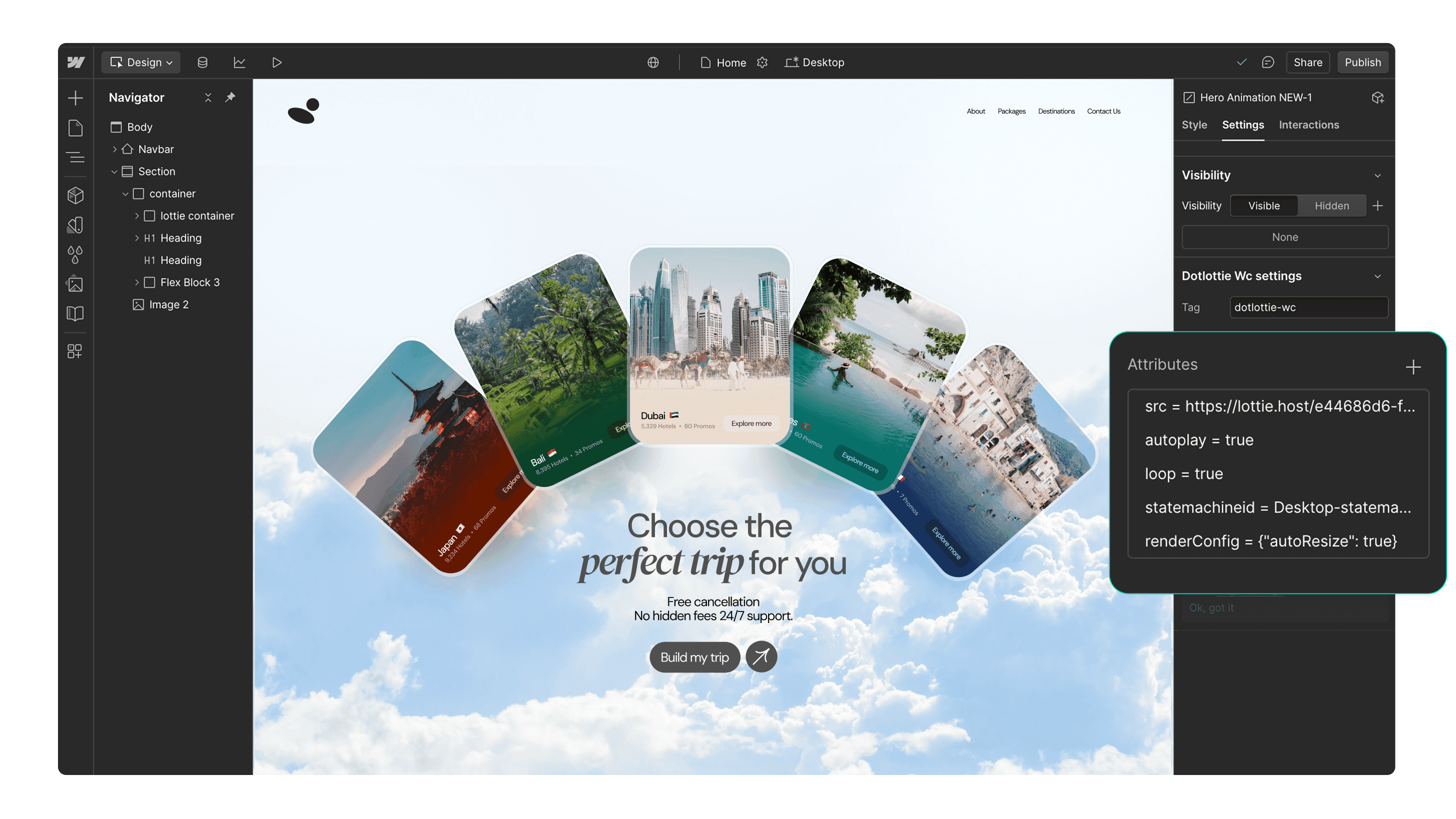
Plus de 100 000 animations Lottie gratuites et prêtes à l'emploi pour vous lancer
Accédez aux animations privées de votre équipe et insérez-les directement sur Webflow
Support dotLottie natif optimisé sur Webflow pour des vitesses de chargement de page plus rapides
Personnalisez facilement les animations pour correspondre à vos couleurs de marque
Fonctionne parfaitement avec les fonctionnalités d'interactivité de Webflow
Captiver vos utilisateurs avec des animations basées sur des déclencheurs
Page load
Parallax
Reveal
Construit avec Lottie. Fabriqué avec Webflow.
Découvrez et inspirez-vous de ces superbes sites Webflow qui ont été créés en utilisant des animations Lottie.


Commencez en 3 étapes simples

Installez l'application
Installez l'application LottieFiles pour Webflow et autorisez-la pour vos projets.

Recherchez une animation
Recherchez une animation Lottie en utilisant les onglets 'Découvrir' ou 'Espaces de travail'.

Insérez l'animation
Insérez l'animation dans vos sites Webflow. Vous pouvez personnaliser les couleurs de l'animation ou ajouter de l'interactivité.
Ressources supplémentaires
Voici quelques inspirations pour vous aider à démarrer avec LottieFiles pour Webflow.








FAQs
Qu'est-ce que LottieFiles pour Webflow?
LottieFiles for Webflow is an official Webflow app that lets you easily add lightweight, scalable Lottie animations to your website without writing code. It gives you access to over 100,000 free animations plus your private LottieFiles workspace, all directly inside Webflow. Perfect for creating engaging, high-performance visuals in JSON or dotLottie format.
Comment installer LottieFiles pour Webflow ?
To install LottieFiles for Webflow from the Webflow Marketplace:
1. Go to the LottieFiles for Webflow app’s page on the Webflow Marketplace
2. Click ‘Add to site’
3. Select the Workspaces and/or sites you want to add the app to
4. Click ‘Authorize app’
5. Click ‘Go to LottieFiles for Webflow’ on the pop-up banner
6. Follow the app’s instructions to add it to your site
Où puis-je trouver des animations Lottie pour mes sites Webflow ?
LottieFiles for Webflow provides access to a vast library of Lottie animations right within Webflow. You can browse through the library directly from within Webflow, search for specific animations based on keywords or categories, and choose the ones that best suit your design needs.
Les animations Lottie sont-elles prises en charge sur Webflow ?
Yes. Webflow natively supports Lottie animations in both JSON and dotLottie formats, ensuring they load quickly and maintain high visual quality. This means you can integrate interactive, scalable animations directly into your Webflow projects without additional setup.
Puis-je personnaliser les animations Lottie sur mes sites Webflow ?
Yes, LottieFiles for Webflow allows you to customize the inserted animations by applying your brand colors.
Les animations Lottie dans LottieFiles pour Webflow sont-elles gratuites?
Yes. LottieFiles for Webflow includes thousands of free animations you can use in your projects. Some premium animations may also be available for purchase within the LottieFiles library.
Puis-je utiliser LottieFiles pour Webflow dans mes projets commerciaux ?
Yes, you can use LottieFiles for Webflow in both personal and commercial projects. The app provides a versatile collection of animations that can elevate the visual appeal of your Webflow sites.
De nouvelles animations sont-elles régulièrement ajoutées à LottieFiles pour Webflow?
Yes, the creators in the LottieFiles community add hundreds of new animations to the public library every day. This ensures that you always have fresh and exciting options to choose from, providing endless possibilities for your Webflow sites.
Y a-t-il une limite au nombre d'animations Lottie que je peux utiliser avec LottieFiles pour Webflow?
There is no specific limit to the number of Lottie animations you can use with LottieFiles for Webflow. You can incorporate as many animations as you desire, allowing you to create truly immersive and engaging websites.
Puis-je accéder à mes animations privées via l'application LottieFiles pour Webflow?
Yes, you can access and insert your private animations from your LottieFiles workspace directly into your Webflow sites.
What are trigger-based animations in LottieFiles for Webflow?
Trigger-based animations in LottieFiles for Webflow are animations that play based on specific user actions or page events, such as when a page loads, when a user scrolls (parallax), or when an element is revealed on screen. These animations help create a more interactive and engaging user experience, guiding attention and adding visual interest to your site.
Do Lottie animations affect my site speed in Webflow?
Lottie animations are lightweight and optimised for web performance. For best results, use the dotLottie format, keep animation complexity minimal, and limit the number of simultaneous animations on a page to ensure fast loading.
Prêt à ajouter du mouvement à Webflow?
Avec LottieFiles pour Webflow, vous pouvez ajouter facilement et rapidement du mouvement à votre site Webflow.