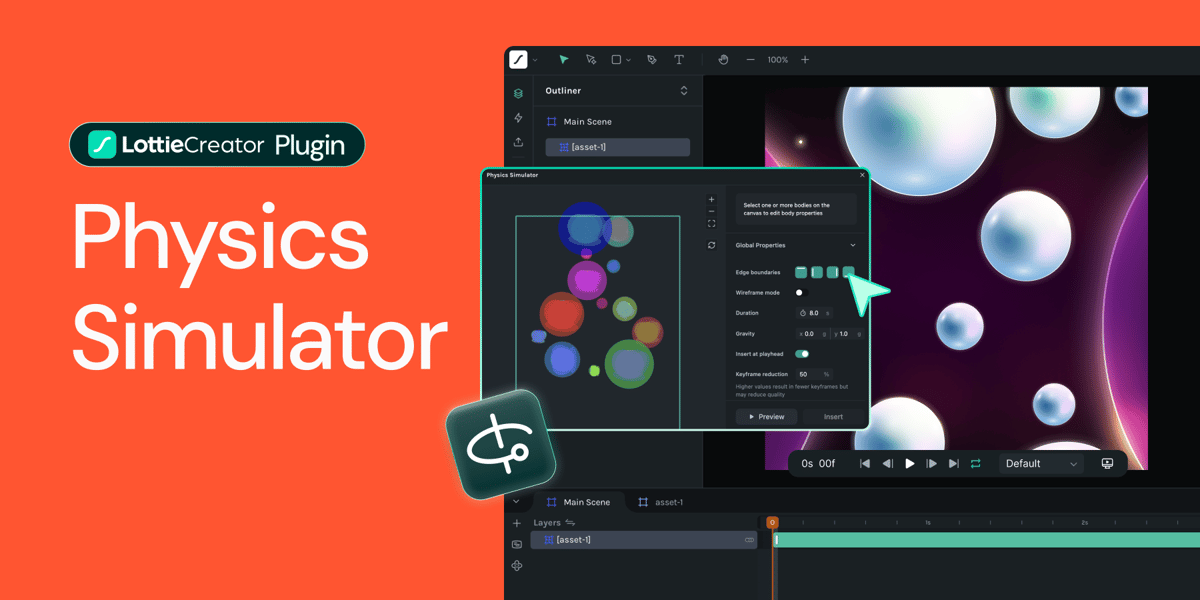
Some parts of animation are creative decisions: the timing of a reveal, the personality of a bounce, the flow between scenes. And then there's the other stuff, such as calculating how fast something falls, guessing deceleration curves, manually keyframing every collision point until it "looks right."
That second part? That's just math. And we thought, why should designers do math when computers are really, really good at it?
So we built a physics simulator for LottieFiles Creator.
Meet Physics Simulator 🔥
— LottieFiles (@LottieFiles) December 10, 2025
Add gravity, realistic bounces or dial in friction & mass. It’s all possible! pic.twitter.com/5j2gn8ARp3
The Problem: Intuition-Based Physics
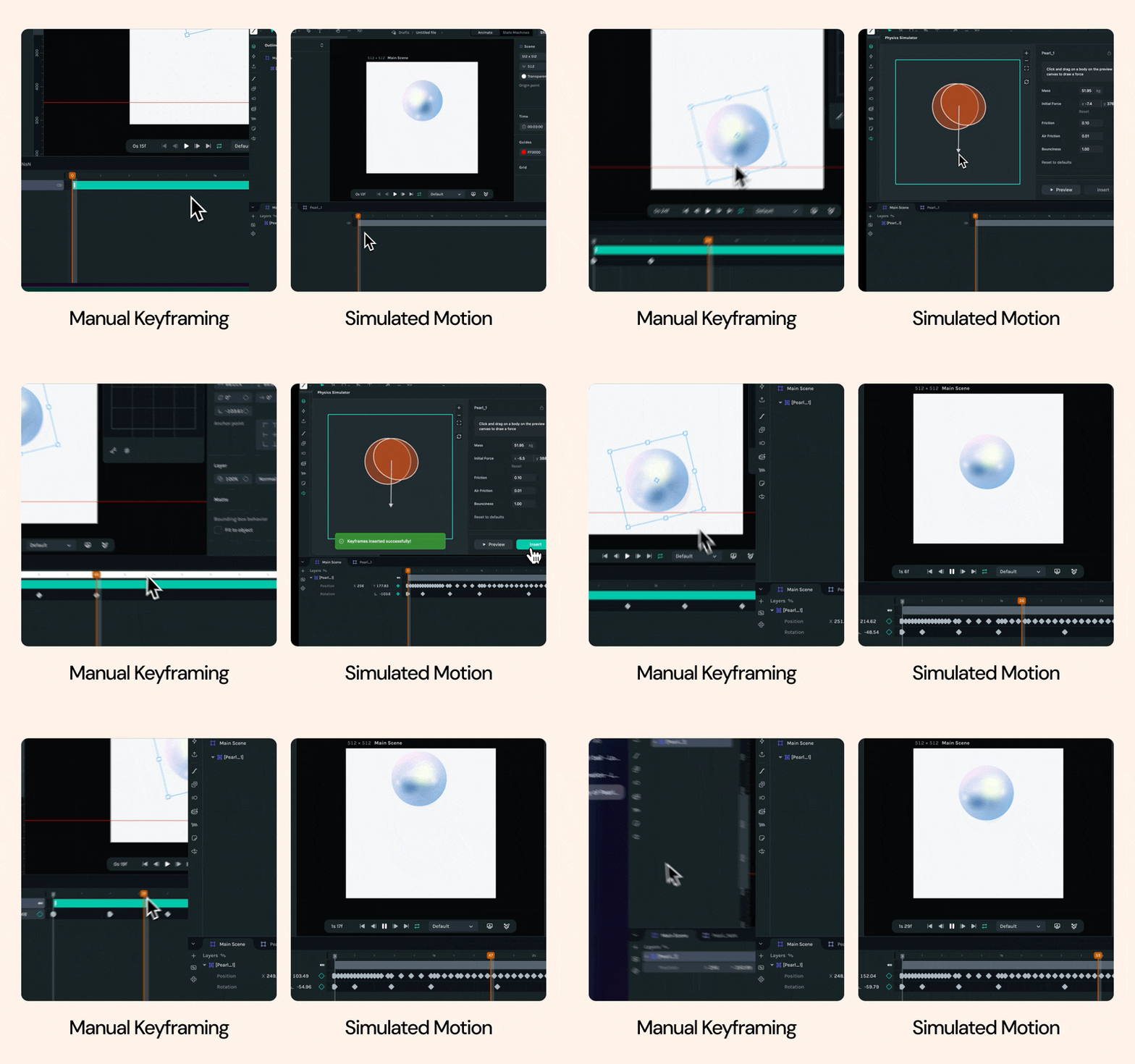
Here's what animating physics motion looks like without simulation. Let say you have this animation and we want it to bounce across the screen. To do so, you need to figure out:
- How fast does gravity accelerate it?
- What's the arc of the trajectory?
- Where does it hit the ground?
- How high does it bounce back?
- How does the rotation sync with the motion?
You can eyeball it. You can reference real footage. You can spend an hour tweaking easing curves until it feels natural. And then your client says "can it bounce higher?" and you start over.
It's tedious. It's complex. And it pulls you out of the creative work.
Why Build This in Creator?
Sure, there are physics plugins for After Effects. There are standalone simulation tools. But Creator is about Lottie-native workflows—keeping designers in one place, focused on the creative decisions, not context-switching between tools.
Having a physics simulation right where you're already working made sense. Drop objects on the canvas, set some properties, hit simulate. Done.
What We Built: Fast Iteration with Creative Control
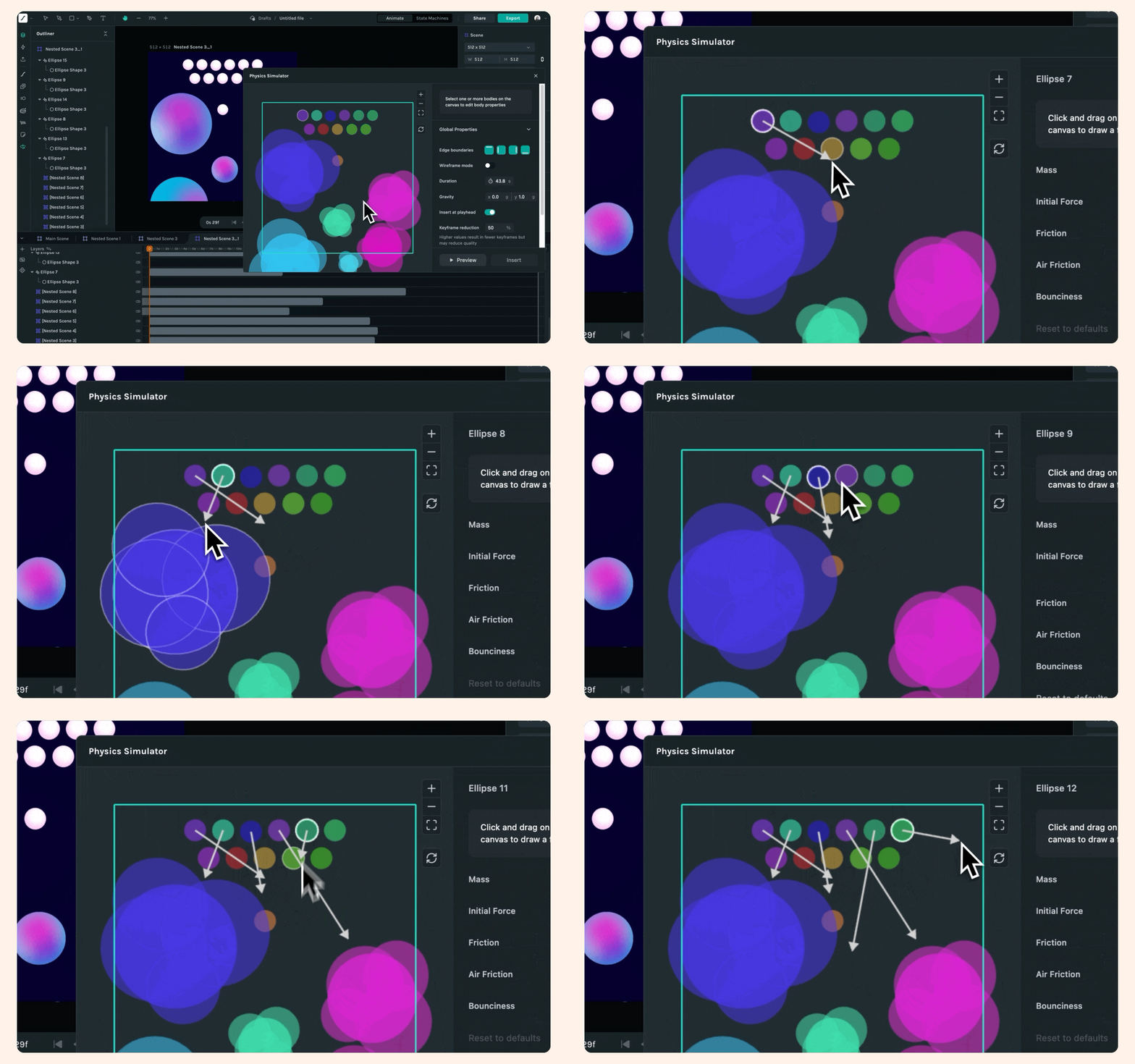
The workflow is straightforward:
- Select layers in your scene
- Configure physics (gravity, boundaries, object properties like mass and friction)
- Draw force vectors visually on the canvas (no guessing at X/Y values)
- Run simulation and watch it play out in real-time
- Insert keyframes directly into your animation
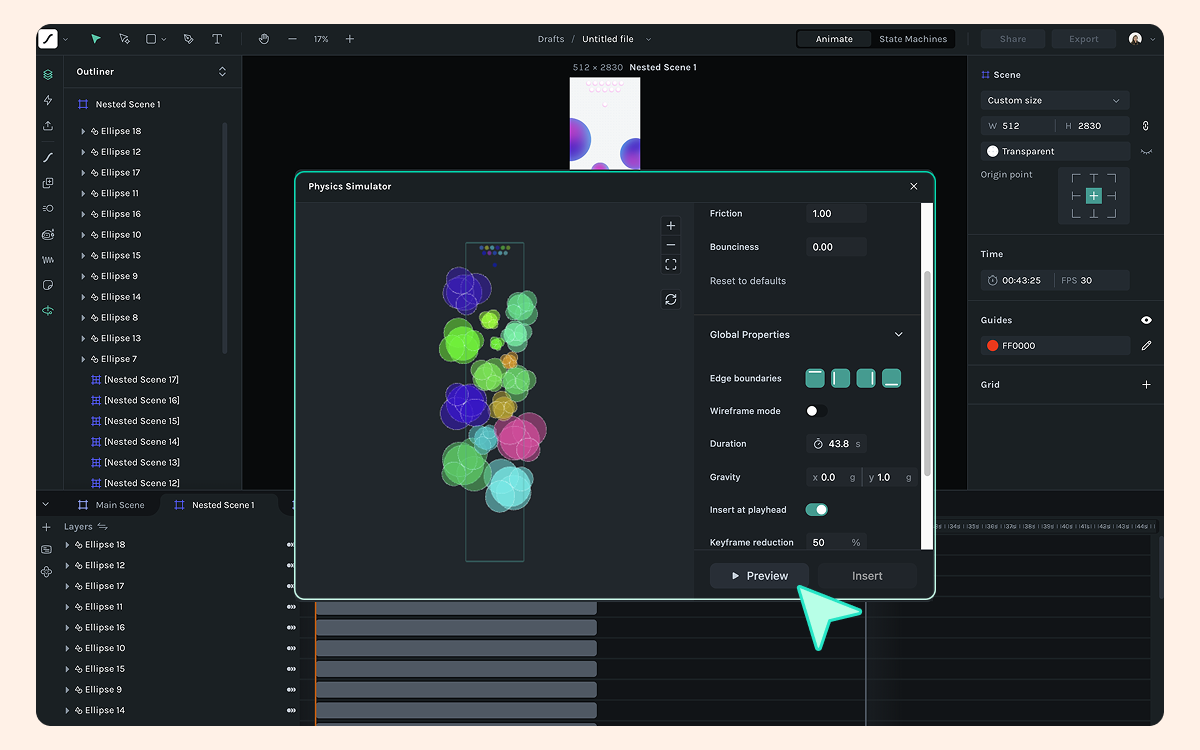
The key was making it feel like a design tool, not an engineering tool. You can:
- Adjust gravity with a slider
- Draw initial forces by dragging on objects (with snapping to cardinal directions)
- Tweak bounciness, friction, mass
- Toggle objects as static (walls, floors) or dynamic (moving objects)
- Control keyframe density with an "accuracy vs editability" slider
It's physics simulation, but with designer-friendly controls.
The Geometry Challenge: When Shapes Get Complex
Early prototypes worked great with simple shapes like circles, rectangles, and basic polygons. Then we tested it with real designs.
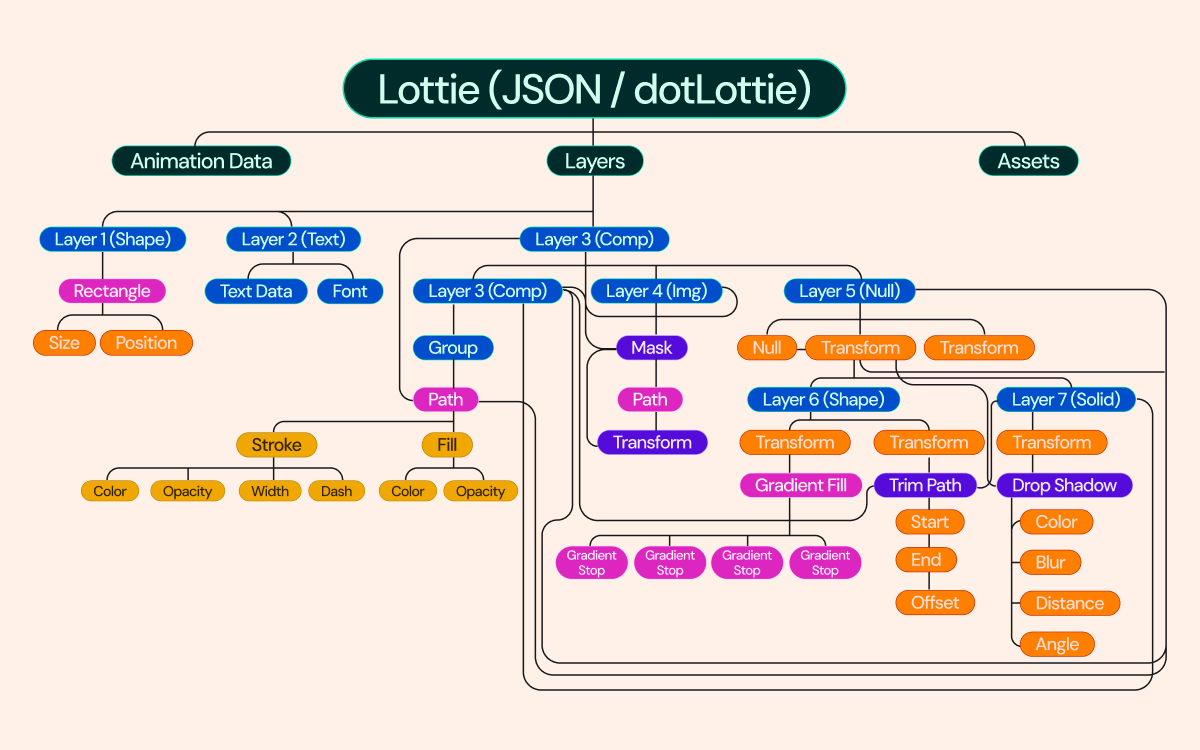
Lottie animations are complex. You've got:
- Bezier paths with dozens of control points
- Nested shape groups
- Precompositions with overlapping layers
- Masks that change the visual outline
- Transform hierarchies that don't map cleanly to physical space
The question became: what's the collision boundary?
For a simple circle, it's obvious. For a masked precomp with nested transforms and overlapping shapes? Not so much.
Translating Lottie to Physics Bodies
Here's what we ended up doing:
- Linearize bezier curves into polygons (balancing detail vs performance)
- Filter nested shapes (if a shape is completely inside another, it doesn't affect the outer boundary)
- Optimize vertex count to keep simulations fast
- Hand off to Matter.js (the physics engine) for convex decomposition
We chose Matter.js because it's proven, well-documented, and had exactly what we needed: rigid body dynamics, collision detection, and constraints. No need to reinvent the wheel.
The Compromises We Made
Not everything works yet. We made some opinionated choices:
Rigid bodies only: No soft body deformation, cloth, or fluids. Those would require animating the bezier control points themselves, not just transforms. That's a different beast entirely.
Static snapshots: If your layer already has keyframed animation, we take a static snapshot of its initial state and run physics on that. Precomp internals (like a walk cycle) still animate, but we simulate the overall position/rotation. Trying to factor in existing motion was... too complex.
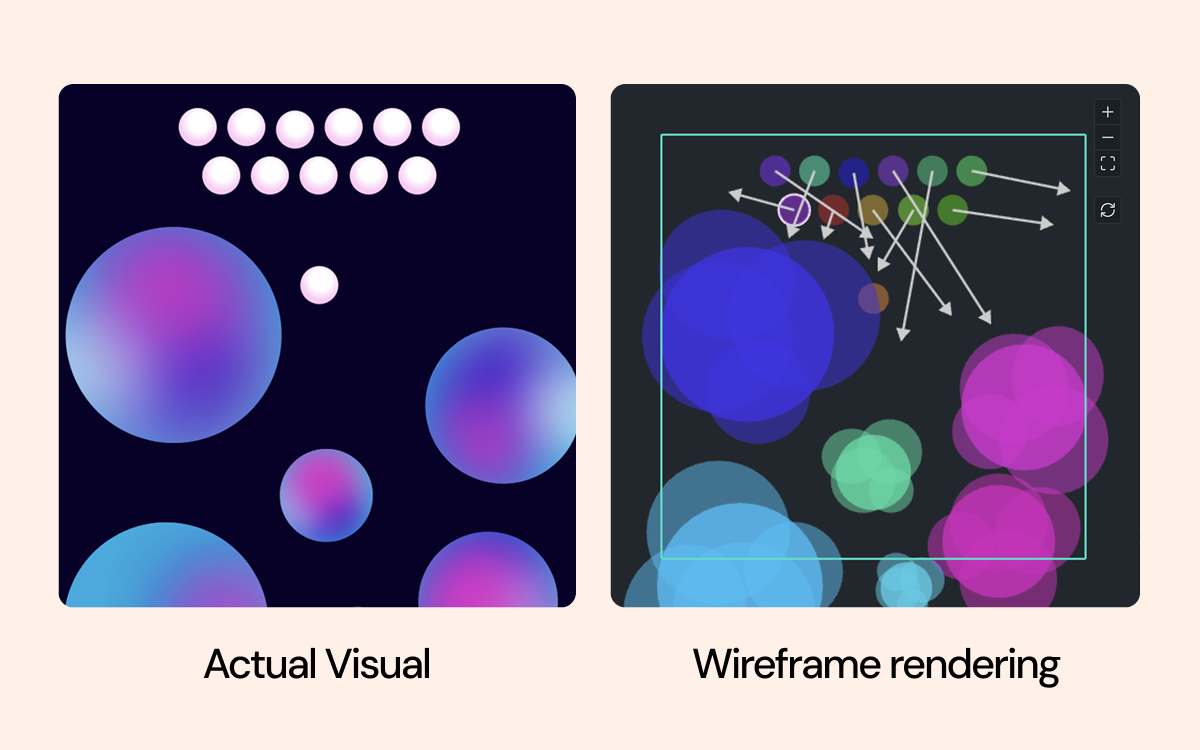
Outline And wireframe rendering: We don't re-render the full visual appearance during simulation, so you see the physics boundaries instead. Re-implementing Creator's entire rendering system would have been overkill. For collision simulation, boundaries are enough.
Making It Usable: The Keyframe Problem
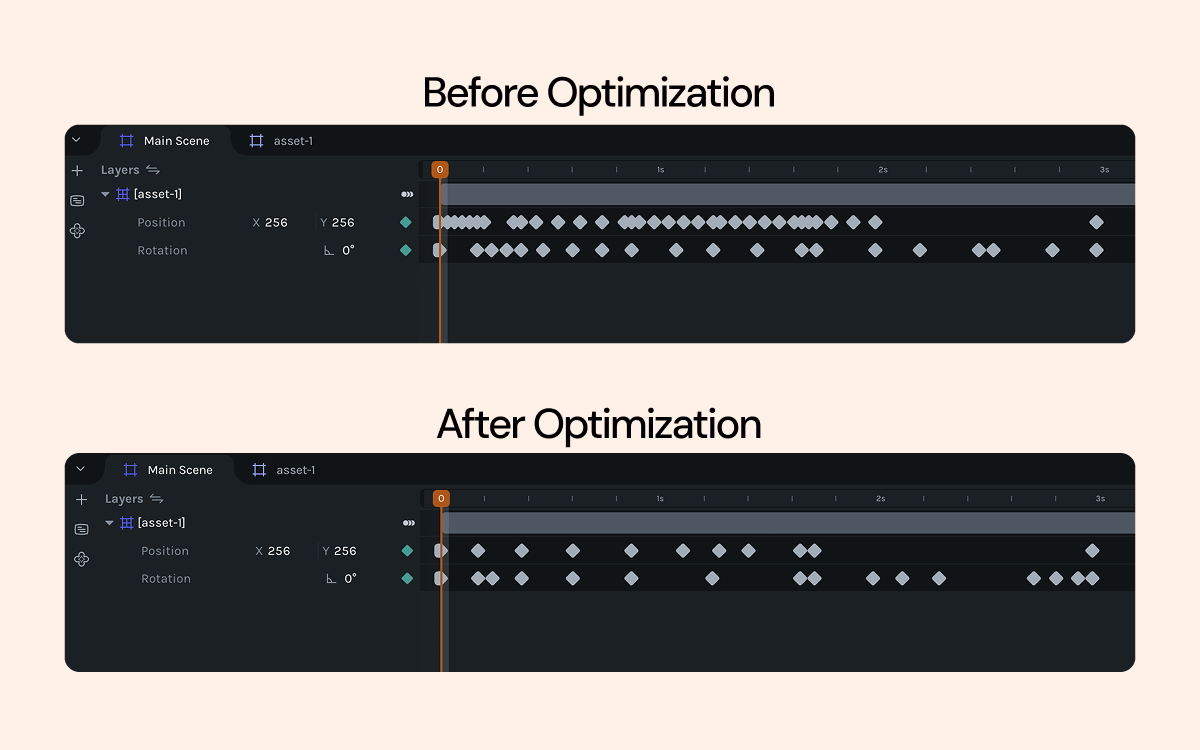
Physics simulations run at 60fps. Over 3 seconds, that's 180 frames of data.
You can't hand an animator 180 keyframes and say "here, edit this." That's not editable, it's a data dump.
So we built a keyframe optimizer using the Ramer-Douglas-Peucker algorithm. It detects inflection points (bounces, direction changes) and removes redundant frames while preserving the motion's character.
Designers control the tradeoff with a slider:
- More keyframes = more accurate to the simulation, but harder to tweak
- Fewer keyframes = easier to edit, but might lose subtle details
We tuned the default to 50%—a sensible middle ground that works for most cases.
Physic Simulator in action
Gravity
Go ahead and interact with our astronaut. He’s weightless and floating… until you flip the gravity switch. Then watch the sudden drop as real-world physics kick in.
Remix link: Astronaut remix
Friction
When wind, air, and the mass of a person interact, there’s naturally some friction between the elements — and you can simulate that too using the Physics Simulator.
Remix link: Parachute remix
Mass
If the bird were light, it would barely make any impact on the barricade. However, in this case, because the bird is being force-pushed, it creates a heavy mass that pushes all the elements, causing the entire sculpture to collapse.
Remix link: Bird remix
Combination of mass, gravity and bounce
The filter animation here is a unique one, and one of our favorites because it blows our mind to think that if we had to animate this frame by frame manually, we probably wouldn’t be able to nail the exact physics: how much heavier the larger objects should feel compared to the smaller ones, or how to get that perfect bounce.
Remix link: Filter remix
Try It Out
Physics Simulator is now in LottieFiles Creator. Drop some objects on the canvas, set gravity, and watch them go. Some parts of animation are creative decisions. The rest is just math, and now the math handles itself.